Examples and costs reflect sources at original Nov 19, 2024 publication. Verify current vendors, MLS/IDX and TCPA/CAN-SPAM rules before buying.
- Real estate chatbots can capture and qualify leads 24/7, even when your team is offline
- Modern AI chatbots understand context, ask smart follow-up questions, and route leads intelligently
- Seamless CRM integration is critical for converting chatbot conversations into closed deals
- Conversation design matters more than technology—your chatbot must sound human, not robotic
- Track response time, qualification rate, and tour bookings to measure ROI effectively
The real estate industry runs on speed and relationships. When a prospect visits your website at 11 PM or texts your listing number on a Saturday morning, they expect an answer—immediately. If you're not there, they'll call the next agent. This is where AI chatbots transform the game, capturing leads, qualifying intent, and booking appointments around the clock.
The reality of modern real estate is brutal: buyers and renters are more impatient than ever, with attention spans measured in seconds, not minutes. They're comparing multiple properties simultaneously, often across different platforms and devices. The window of opportunity to capture their interest is vanishingly small. Meanwhile, agents are juggling showings, negotiations, paperwork, and personal lives—they can't possibly respond to every inquiry instantly. This creates a critical gap between when leads arrive and when they're engaged, and in that gap, opportunities disappear.
Chatbots bridge this gap by providing instant, intelligent engagement at the exact moment of highest interest. They don't just capture contact information—they qualify intent, answer questions, build rapport, and move prospects toward action, all while your team is sleeping, showing properties, or enjoying time off. The result? More leads captured, better lead quality, higher conversion rates, and agents who can focus on what they do best: building relationships and closing deals.
This guide covers everything you need to know about real estate chatbots: why they matter, how they work, what features to look for, how to integrate them with your existing systems, and how to measure success. We'll explore real-world implementation strategies, common pitfalls to avoid, and emerging trends that will shape the future of real estate marketing. Whether you're a solo agent exploring automation or a brokerage managing hundreds of listings across multiple markets, this is your definitive roadmap to chatbot success.
See how this works on live listings: See Demos and How we build.
Why Real Estate Chatbots Matter
Real estate is a high-stakes, time-sensitive business. Prospects research listings late at night, compare properties on their commute, and make decisions quickly. Traditional lead capture—web forms, voicemail, email follow-up—creates friction and delays. Here's why chatbots solve this problem:
Instant Response, 24/7 Availability
The first agent to respond gets the lead. Studies show that responding within 5 minutes increases conversion by 9X compared to waiting 30 minutes. Chatbots respond in seconds, every time, regardless of the hour. They don't take weekends off, don't go on vacation, and never miss a lead because they were in a showing.
Consider this real-world scenario: A young couple finishes dinner at 9:30 PM on a Tuesday. They open their laptop, browse listings on Zillow, click through to your website, and land on a stunning 3-bedroom townhouse in their target neighborhood. They're excited—this might be "the one." They have questions about HOA fees, pet policies, and showing availability. If they encounter a static contact form asking for name, email, phone, and message, they might fill it out... or they might click away to the next listing. Even if they submit, they won't hear back until tomorrow morning at the earliest, by which time their enthusiasm has cooled and they've looked at 15 other properties.
Now imagine the same scenario with a chatbot. The moment they land on the page, a friendly message appears: "Hi! I'm here to help with this property. What would you like to know?" They ask about HOA fees, and the bot responds instantly with the exact number. They ask about pets, and the bot confirms the property is pet-friendly with a 2-pet limit. They ask about seeing it this week, and the bot offers three available time slots. Within 90 seconds, they've booked a Thursday evening showing and provided their contact information—not because they were forced to fill out a form, but because the conversation naturally led there. This is the power of instant, conversational engagement.
Common Mistake to Avoid: Don't configure your chatbot to appear too aggressively. A chatbot that pops up immediately with a full-screen overlay and demands attention creates friction, not engagement. Best practice is a small, non-intrusive chat bubble that appears after 5-10 seconds of page activity, or after the user scrolls past a certain threshold. Let users initiate when they're ready, but make it obvious you're available.
Qualification Before Handoff
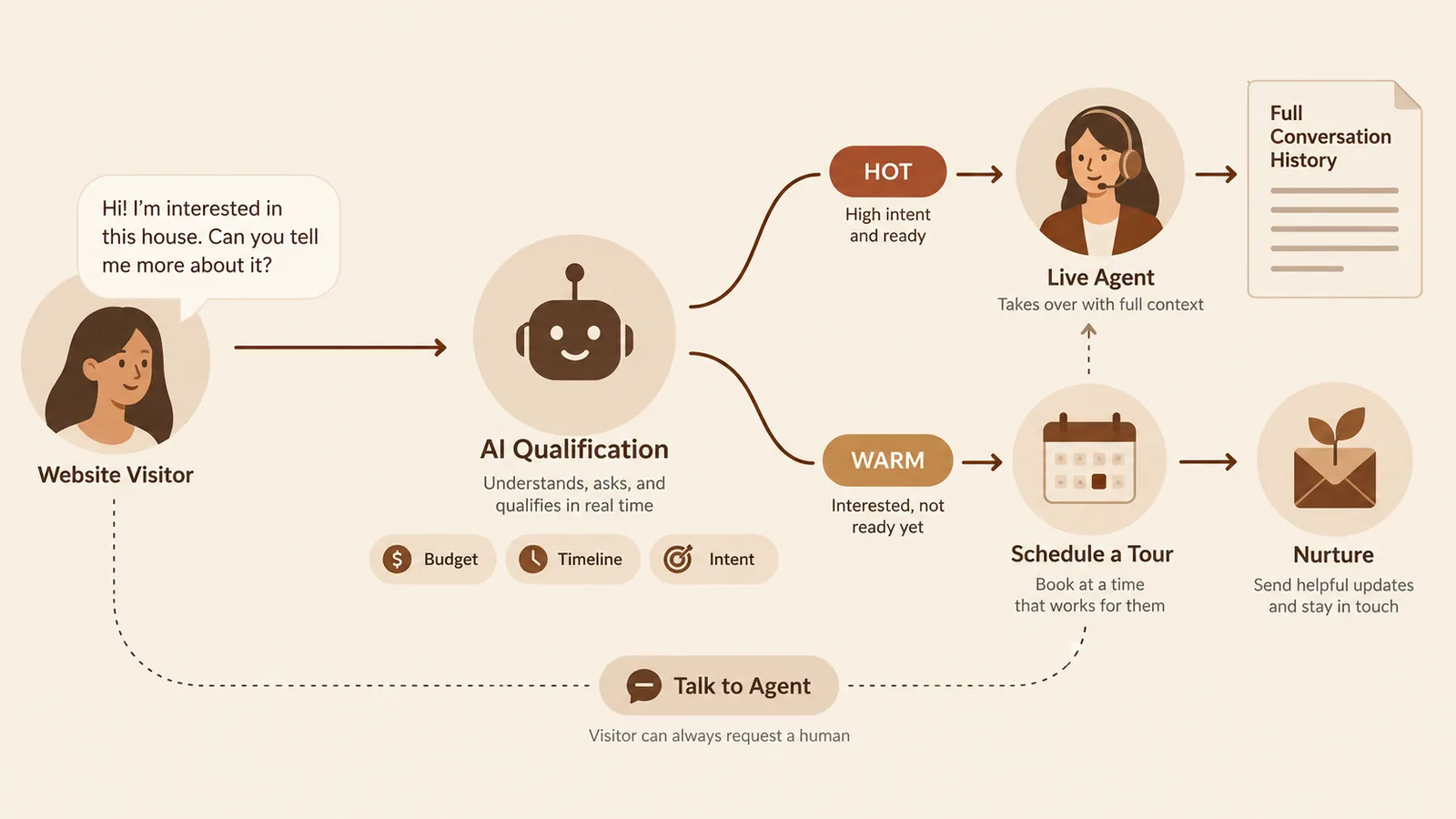
Not every inquiry deserves the same level of attention. A chatbot can ask the right questions upfront—budget, timeline, property type, pre-approval status—and route hot leads directly to your best agents while nurturing exploratory leads with automated follow-up. This protects your team's time and ensures high-value prospects get immediate human attention.
Think about the economics of agent time. A top producer earning $200K annually costs roughly $100 per hour when you factor in benefits, overhead, and opportunity cost. If that agent spends 15 minutes on a phone call with someone who's "just curious" or "not ready to move for two years," you've burned $25 in labor on a lead that won't convert for months or ever. Multiply that across dozens of inquiries per week, and you're hemorrhaging thousands of dollars in wasted time.
A well-designed chatbot flips this equation. It asks strategic qualifying questions in a conversational way: "Are you working with a lender yet?" or "When are you hoping to move?" or "Have you sold your current home?" Based on the responses, it assigns a lead score. A prospect who says "We're pre-approved, our lease ends next month, and we're ready to tour this weekend" gets immediately routed to your best agent with a high-priority notification. A prospect who says "Just looking for now, maybe next year" enters a long-term nurture sequence with automated follow-ups every few weeks. Your agents focus exclusively on high-intent leads, and no opportunity is ignored—even the cold ones stay warm through automation.
Real-World Example: A mid-sized brokerage in Austin implemented a chatbot with tiered qualification. Leads scoring 8+ (pre-approved, ready in <60 days, specific property interest) went directly to agents via SMS alert. Leads scoring 5-7 went into a weekly email sequence. Leads scoring <5 got monthly market updates. The result? Agent productivity increased 40% because they stopped chasing tire-kickers, and long-term conversion improved because cold leads stayed engaged. Within six months, the chatbot had generated $2.3M in closed volume.
Implementation Tip: Don't ask qualification questions in a robotic checklist format. Instead of "What is your budget? What is your timeline? What is your location preference?" try this: "I'd love to help you find the perfect place. Tell me a bit about what you're looking for—what's most important to you?" Then use AI to extract budget, timeline, and preferences from their free-form answer, and ask smart follow-ups only where needed. This feels like a conversation, not an interrogation.
How we route hot leads and measure tour bookings: See Results.
Scalability Without Hiring
As your business grows, so does lead volume. Hiring and training inside sales agents (ISAs) is expensive and time-consuming. A well-designed chatbot handles unlimited simultaneous conversations, scales instantly during peak seasons, and maintains consistent quality every time.
Let's talk about the true cost of hiring ISAs. A single full-time ISA in a major market costs $40K-$60K in salary, plus another 20-30% in taxes, benefits, and overhead—call it $70K all-in. You need to train them (2-4 weeks), supervise them, deal with turnover (industry average is 18-24 months tenure), and manage inconsistency in performance. If you're handling 500+ leads per month, you might need 2-3 ISAs, putting your annual cost at $150K-$200K. And if you experience seasonal fluctuations—say, spring buying season doubles your lead volume—you either hire more (expensive and slow) or let leads pile up (lost opportunity).
A chatbot, by contrast, costs $200-$2,000 per month depending on features and volume, requires no benefits or management, never quits, and scales infinitely. It handles 10 simultaneous conversations as easily as 100. During peak season, it doesn't slow down or burn out. It maintains perfect consistency—every lead gets the same high-quality initial experience, whether they're the first inquiry of the day or the 500th.
Moreover, chatbots learn and improve over time. AI-powered bots analyze which questions lead to conversions, which conversation paths cause drop-offs, and which responses resonate best. They optimize automatically, getting better with every interaction. An ISA, meanwhile, might forget training, have a bad day, or develop lazy habits. The chatbot never does.
Common Mistake to Avoid: Don't assume a chatbot eliminates the need for human touch. The best strategy is hybrid: chatbots handle initial engagement, qualification, and scheduling, while humans take over for high-value interactions like complex negotiations, emotional decision-making, and relationship-building. Trying to automate everything creates a sterile, impersonal experience that hurts conversion. The goal is to use bots to amplify your team, not replace them.
Multi-Channel Engagement
Today's buyers expect to reach you on their preferred platform—website chat, Facebook Messenger, SMS, WhatsApp, even Instagram DMs. Modern chatbots work across all these channels, unifying conversations and ensuring no lead falls through the cracks.
The average prospect interacts with your brand across 3-5 different touchpoints before converting. They might discover a listing on Facebook, click through to your website, text a number from a yard sign, and later send a DM on Instagram asking about availability. If each of these channels operates in isolation, you end up with fragmented data, duplicated effort, and confused prospects who have to repeat themselves every time they switch platforms.
Omnichannel chatbots solve this. They maintain a unified conversation history across all platforms, so if someone starts a chat on your website at noon, texts you at 3 PM, and messages you on Facebook at 6 PM, the chatbot recognizes them as the same person and picks up where the conversation left off. Your agents see a single thread in their CRM, not three separate leads. This creates a seamless experience and dramatically improves conversion.
Real-World Example: A luxury condo developer in Miami deployed a chatbot across their website, Facebook, Instagram, and a dedicated SMS shortcode printed on all marketing materials. Over 60% of conversations started on one channel and continued on another. The most common pattern: initial inquiry via Facebook or Instagram (users scrolling on mobile), followed by deeper questions via website chat (users at home on laptop), followed by appointment confirmation via SMS. Because the bot unified everything, prospects never had to re-explain their needs, and the developer saw a 35% increase in tour bookings compared to the previous year when channels were siloed.
Implementation Tip: When deploying multi-channel chatbots, ensure your agents have a single unified inbox. Tools like ManyChat, MobileMonkey, or custom platforms can aggregate messages from web chat, Facebook, Instagram, SMS, and WhatsApp into one interface. Without this, you gain nothing—your team still has to check five different places for messages, and the "unified" experience is a myth. Invest in proper inbox management from day one.
Speed wins deals. According to the National Association of Realtors, 78% of homebuyers purchase from the first agent they contact. Being immediately available—even at midnight—gives you an unfair advantage.
Types of Real Estate Chatbots
Not all chatbots are created equal. Understanding the different types helps you choose the right solution for your needs. The technology you select will determine not just cost, but user experience, conversion rates, and how much ongoing maintenance you'll need. Let's break down each category with real-world context.
1. Rule-Based Chatbots (Decision Trees)
These chatbots follow pre-programmed scripts: "Click here if you're buying," "Click here if you're selling." They're simple, predictable, and cheap—but rigid. If a user asks something outside the script, the bot breaks down. Best for very simple use cases like property info lookups or FAQ answering.
Rule-based bots operate on if-then logic. You design a flowchart of possible user paths, and the bot follows it exactly. Example: User clicks "I'm buying" → Bot asks "What type of property?" → User selects "Condo" → Bot asks "What's your budget?" → User selects "$300K-$500K" → Bot shows matching condos. This works fine if users cooperate and follow your prescribed path. The problem? Real humans don't behave like flowcharts.
What happens when someone types "I'm relocating for work and need a pet-friendly apartment near good schools ASAP"? A rule-based bot has no idea how to parse that. It might respond with "I didn't understand. Please select an option from the menu." Frustrating. The user clicks away, and you've lost a lead.
When Rule-Based Bots Work: They're acceptable for extremely narrow use cases. For example, a bot on a single-property landing page that answers FAQs: "What are the HOA fees? $250/month. What's included? Water, trash, landscaping. When is the open house? Saturday 1-3 PM." Here, the scope is limited, the questions are predictable, and users don't expect sophisticated conversation. Cost is minimal ($0-$100/month), and setup is fast.
When They Fail: Any scenario requiring flexibility, context, or natural conversation. If you're promoting multiple listings, handling diverse inquiries, or expecting users to ask open-ended questions, rule-based bots create more frustration than value. They also require constant manual updates—every time you add a new property or change a price, you're editing decision trees by hand.
2. Keyword-Based Chatbots
These bots scan messages for specific keywords (e.g., "3 bedroom," "Downtown," "price") and trigger responses. They're slightly smarter than rule-based bots but still struggle with natural language. If someone types "I need a place near good schools for my two kids," a keyword bot might miss the intent entirely.
Keyword bots use pattern matching: if the message contains "bedroom" or "bed," trigger the bedroom-related response. If it contains "price" or "$" or "budget," trigger the pricing response. This allows for more natural user input than button-clicking, but it's still brittle. Synonyms, slang, misspellings, and complex sentences confuse them.
Consider these variations of the same question: "How much does it cost?" / "What's the asking price?" / "Is it expensive?" / "Can you tell me the price range?" / "What are they asking for it?" A keyword bot programmed to look for "price" might catch some of these, but miss others. Worse, if someone says "I'm not interested in anything over $500K," a poorly configured keyword bot might see "$500K" and start showing listings at that price, completely missing the "not over" part.
Real-World Example: A small brokerage implemented a keyword-based chatbot to handle rental inquiries. It was programmed to respond to "lease," "rent," "apartment," "availability," etc. A prospect asked, "Do you have anything pet-friendly?" The bot didn't recognize "pet-friendly" as a keyword, so it responded with a generic "I'm sorry, I didn't understand." The prospect left. When the brokerage reviewed transcripts, they found dozens of similar failures: "near the subway," "with parking," "utilities included"—all unanswered because keywords weren't configured. They eventually scrapped it and upgraded to AI.
Cost and Maintenance: Keyword bots cost $50-$300/month depending on the platform. They require ongoing tuning—adding new keywords, refining patterns, fixing edge cases. This becomes a part-time job, and even with constant maintenance, they'll never feel truly conversational.
3. AI-Powered Conversational Agents (NLP/LLMs)
This is where modern real estate chatbots live. Built on natural language processing (NLP) and large language models (LLMs) like GPT-4, Claude, or specialized real estate AI, these bots understand context, interpret nuanced questions, ask intelligent follow-ups, and adapt to the conversation. They feel less like a bot and more like texting a knowledgeable assistant.
For example, a prospect asks: "Do you have anything under $500K near the new Metro station?" An AI chatbot can extract location (near Metro station), budget (under $500K), and transportation preferences (proximity to transit), then respond with relevant listings and ask qualifying questions like timeline and financing status. If the user then says "Actually, we might stretch to $550K for the right place," the AI understands they're revising their budget and adjusts recommendations accordingly. It doesn't get confused by synonyms, slang, or complex sentences.
AI chatbots use machine learning models trained on billions of conversational examples. They don't rely on keyword matching—they understand semantic meaning. "How much is it?" and "What's the asking price?" and "Is it expensive?" are all understood as requests for pricing information. "I'm not interested in fixer-uppers" is understood as a condition preference, not a keyword trigger. "We need to be near my daughter's school in Riverside" is understood as a location constraint tied to a specific neighborhood.
Advanced Capabilities: Modern AI chatbots can handle multi-turn conversations with context retention. Example: User says "I'm looking for a 3-bedroom house." Bot asks "What's your budget?" User says "Around $600K." Bot asks "Any preferred neighborhoods?" User says "Somewhere family-friendly with good schools." Bot responds "Got it! I have 8 houses that fit: 3 bedrooms, under $600K, in top-rated school districts. Here are the top 3..." This feels natural because the bot remembers everything said earlier and builds on it, just like a human conversation.
Real-World Example: A luxury real estate group in San Francisco deployed a GPT-4-powered chatbot trained on their entire MLS database and local market knowledge. Prospects could ask things like "Show me Mediterranean-style homes with ocean views in Marin County" or "What's the market like for condos in SOMA right now?" The bot understood architectural styles, geographic nuances, and even market trends. It answered questions like "Are prices going up or down?" with data-backed responses: "Condo prices in SOMA have softened 3% over the past quarter, making it a good time for buyers." Conversion rates doubled compared to their old keyword bot, and customer satisfaction scores jumped 60%.
Cost and Setup: AI-powered chatbots range from $300-$2,000/month for off-the-shelf platforms (like Drift, Intercom, or real estate-specific tools like Structurely or Ylopo), or $5K-$20K for custom-built solutions. Setup takes 1-4 weeks depending on complexity. The investment pays off through higher conversion, better user experience, and dramatically less maintenance—AI bots improve on their own through machine learning.
4. Hybrid (AI + Human Handoff)
The best real estate chatbots blend AI and human touch. The bot handles initial engagement, qualification, and scheduling, then seamlessly transfers complex or high-value conversations to a live agent. This maximizes efficiency without sacrificing the personal relationship that closes deals.
Here's how hybrid systems work in practice: The AI chatbot engages new visitors, answers common questions, qualifies intent, and collects contact information. If the conversation is straightforward—scheduling a showing for a listed property, answering FAQ, providing neighborhood info—the bot handles it end-to-end. But if the prospect asks something complex ("What's the HOA's policy on short-term rentals?"), emotional ("This would be perfect for my elderly parents—can you help me understand accessibility features?"), or high-value ("I'm a cash buyer ready to close in 30 days"), the bot recognizes the need for human expertise and escalates.
The handoff happens in real-time if an agent is available: "Let me connect you with Sarah, one of our specialists. She's online now and can dive deeper into this with you." If no agent is available, the bot schedules a callback: "Great question! I've flagged your conversation for our team. When's a good time for someone to call you? Tomorrow morning? Tomorrow afternoon?" Either way, the transition is smooth, the context is preserved (the agent sees the full chat history), and the prospect feels heard.
Why Hybrid Wins: AI bots are perfect for repetitive, high-volume tasks: answering "What's the square footage?" 500 times per month, booking showings, sending listing links. But they can't replace human judgment in complex negotiations, emotional reassurance, or relationship-building. Hybrid systems give you the best of both worlds—automation at scale, with human expertise exactly when it matters most.
Real-World Example: A brokerage managing 200+ rental listings implemented a hybrid chatbot. The bot handled 80% of inquiries end-to-end: availability questions, application links, pet policy, parking, tour scheduling. But when a prospect said "I have a complicated situation—I'm relocating for a job, my credit is okay but not great, and I have two large dogs," the bot recognized complexity and routed to a leasing specialist within 60 seconds. The specialist, seeing the full conversation history, jumped in with tailored solutions: "Thanks for sharing that! We have a few properties with flexible pet policies, and I can walk you through our application process to set realistic expectations on approval. Let's start with..." The prospect converted. Without the handoff, the bot would have fumbled. Without the bot, the specialist would have wasted 5 minutes asking the same qualifying questions the bot already covered.
Implementation Tip: Configure smart handoff triggers. Don't just route "complex" questions to humans—define what "complex" means. Examples: questions containing words like "negotiate," "exception," "special circumstance," "urgent," or "problem." Sentiment detection (frustrated tone, multiple unanswered questions) should also trigger handoff. And always give users a manual escape hatch: "Want to talk to a human? Click here anytime."
Start with AI-powered conversational agents. Rule-based bots frustrate users and hurt your brand. Modern AI chatbots are affordable, easy to set up, and deliver significantly better results.
Key Features Every Real Estate Chatbot Needs
When evaluating chatbot platforms, look for these essential capabilities. These features separate professional-grade solutions from toy chatbots that waste your time and frustrate prospects.
Lead Capture and Qualification
- Contact information collection: Name, phone, email (validated and formatted)
- Property preferences: Bedrooms, bathrooms, square footage, parking, pet policies
- Budget and financing: Price range, pre-approval status, down payment readiness
- Timeline and urgency: Moving date, lease expiration, motivation level
- Location requirements: Neighborhoods, school districts, commute constraints
This is the foundation. Every chatbot must collect accurate contact details and qualify intent. But the how matters as much as the what. Bad chatbots ask for name/email/phone immediately, before offering any value. This feels transactional and kills engagement. Smart chatbots earn contact information by providing value first: answering questions, showing relevant listings, offering useful insights. Only after building rapport do they say, "I'd love to send you more options. What's the best email to reach you at?"
Validation is Critical: Ensure your chatbot validates inputs in real-time. If someone enters "john@gmailcom" (missing the dot), the bot should catch it and ask for correction. If they enter a phone number as "555-1234" (missing area code), the bot should prompt for the full number. Clean data going into your CRM is non-negotiable. Garbage in, garbage out.
Progressive Profiling: Don't ask all qualification questions at once. Start light: "What type of property are you looking for?" Then layer in more questions: "What's your ideal budget range?" Then: "When are you hoping to move?" This feels conversational, not interrogative. Advanced platforms remember answers across sessions—if someone returns to your site a week later, the bot says "Welcome back! Last time you were interested in 2-bedroom condos under $400K. Still looking?" No need to re-qualify from scratch.
Real-World Example: A high-volume rental platform tested two qualification flows. Flow A asked for name, email, phone, move-in date, budget, and property type all upfront—a 6-question gauntlet. Flow B started with "What brings you here today?" extracted key info from the answer, then asked 1-2 clarifying questions conversationally, and only requested contact info after showing relevant listings. Flow A had a 12% completion rate. Flow B had 41%. The lesson: qualification works when it feels like conversation, not a form.
Listing Search and Recommendations
Your chatbot should integrate directly with your MLS or property database to answer questions like "Show me 3-bedroom homes under $600K in Westwood." It should display listings with photos, prices, addresses, and direct links—all within the chat interface.
This is where chatbots transform from glorified contact forms into genuine sales tools. When a prospect asks "What's available in my budget?" the bot should instantly search your inventory, apply filters, rank by relevance, and present results—complete with high-quality images, key details, and one-click access to full listings or virtual tours.
Key Technical Requirements: API integration with your MLS, IDX feed, or property management system. The bot needs real-time data access—not a static CSV file updated weekly. If a property goes under contract, the bot should know immediately and stop showing it. If a new listing hits the market, the bot should be able to recommend it within minutes. Stale data destroys trust.
Smart Recommendations: The best chatbots don't just match criteria—they recommend based on behavior and preferences. If a prospect views three listings in the same neighborhood, the bot notices: "I see you're interested in Riverside. Here are two more properties in that area that just came on the market." If they consistently click on listings with modern kitchens, the bot learns: "Based on what you've looked at, I think you'll love this place—completely renovated kitchen with quartz countertops and stainless appliances."
Visual Presentation Matters: Don't just send a text link. Display listings as rich cards within the chat: photo, price, address, bed/bath count, square footage, and a clear CTA ("See Photos," "Book a Tour," "Learn More"). Mobile users especially appreciate visual, tap-friendly interfaces.
Implementation Tip: If you don't have an API-enabled MLS/IDX solution, you can still make this work with tools like Zapier or custom integrations. Alternatively, some chatbot platforms (Structurely, Ylopo, CINC) come pre-integrated with major real estate databases. Budget 5-15 hours for initial integration and testing to ensure data accuracy.
Appointment Scheduling
The best chatbots book showings, consultations, and open house reservations in real time. They check agent availability, suggest time slots, send calendar invites, and set automated reminders. This eliminates the back-and-forth of email scheduling and captures commitment while interest is high.
Scheduling is where many leads die. Traditional process: prospect fills out form → agent emails "When works for you?" → prospect replies "How about Tuesday?" → agent replies "I'm booked Tuesday, how about Wednesday?" → three emails later, they finally agree on a time. By then, the prospect has toured two other properties and lost interest in yours. Chatbots kill this friction.
How Smart Scheduling Works: The bot connects to your team's calendars (Google Calendar, Outlook, Calendly, etc.) and sees real-time availability. When a prospect says "I want to see this property," the bot responds: "Great! I have availability Thursday at 2 PM, Friday at 10 AM, or Saturday at 11 AM. What works best?" The prospect picks, and boom—appointment booked. Confirmation is sent via email and SMS, with a calendar invite attached. Reminders go out 24 hours and 1 hour before the showing. If the prospect needs to reschedule, they can do so via a link in the reminder, and the bot adjusts automatically.
Advanced Features: Buffer time between appointments (prevent back-to-back showings with no travel time), route bookings to specific agents based on geography or property type, and blackout personal time (don't let prospects book during your kid's soccer game). The best systems also handle group scheduling—open houses where multiple prospects can book the same time slot.
Real-World Example: A solo agent in Denver integrated a chatbot with her Google Calendar. Before the bot, she spent 2-3 hours per week coordinating showings via phone tag and email. After the bot, showings were booked automatically, and she reclaimed that time for client relationships and negotiations. Her showing volume increased 50% because prospects could book instantly at midnight or Sunday morning instead of waiting for business hours.
Common Mistake to Avoid: Don't offer unlimited availability. If your bot says "When would you like to schedule?" and waits for the prospect to suggest a time, you're back to email tennis. Always offer 2-3 specific time slots. This makes decision-making easy and moves the conversation forward.
CRM and Database Integration
Every conversation must flow into your CRM (Salesforce, HubSpot, Follow Up Boss, kvCORE, BoomTown, LionDesk, etc.). The chatbot should create or update contact records, log interactions, assign leads to agents based on rules, and trigger follow-up workflows. If your chatbot operates in a silo, you lose visibility and accountability.
CRM integration is the difference between a chatbot being a curiosity and a revenue driver. Without it, your bot is just collecting data that goes nowhere. With it, every conversation becomes actionable intelligence that feeds your sales pipeline.
What Proper Integration Looks Like: Prospect chats with your bot at 8 PM. Bot collects name, email, phone, property preferences, and books a showing for Thursday. At 8:03 PM, a new contact appears in your CRM with all details populated: lead source (website chat), qualification score (8/10), notes from the conversation, scheduled appointment, and tags ("hot lead," "pre-approved," "interested in downtown condos"). The assigned agent gets an SMS alert: "New hot lead: Sarah Johnson, pre-approved, wants to see 123 Main St on Thursday 2 PM. Conversation history: [link]." At 8:05 PM, Sarah is automatically enrolled in your "New Buyer" email drip campaign. On Wednesday, the CRM sends her a confirmation reminder. On Friday, if she doesn't reschedule or cancel, she gets a follow-up: "How did the showing go? Questions?" All of this happens without a single manual action from your team.
Lead Assignment Rules: Configure intelligent routing. Leads in ZIP codes 90210-90213 go to Agent A. Leads interested in luxury properties ($1M+) go to Agent B. Leads from Spanish-language conversations go to Agent C. Leads that come in after 6 PM are queued for next-morning follow-up instead of triggering immediate SMS alerts (so agents aren't woken up). This ensures the right agent gets the right lead at the right time.
Workflow Automation: Beyond lead creation, think about triggers. If a lead doesn't respond to follow-up for 7 days, move them from "hot" to "warm" and reduce contact frequency. If a lead clicks on a listing link in an email, log that engagement in the CRM and trigger a personalized message: "Saw you checked out 456 Oak Street—want to see it in person?" If a lead books a showing but cancels twice, flag them for manual agent outreach (maybe they need help or have concerns).
Real-World Example: A brokerage using Follow Up Boss integrated their chatbot via Zapier. Every chatbot lead was tagged with source ("chatbot-website" vs "chatbot-facebook"), qualification score, and conversation summary. They built a dashboard showing chatbot performance: leads captured, qualification rate, appointment booking rate, and ultimate conversion to closed deals. Six months in, they discovered chatbot leads converted at 18% vs. 12% for Zillow leads, at a fraction of the cost. This data justified doubling their chatbot investment and scaling to more channels.
Implementation Tip: Test your integration thoroughly before going live. Send 10 test leads through the chatbot and verify: Do they appear in the CRM? Are fields populated correctly? Do assignment rules work? Are workflows triggered? Does the conversation history sync? Budget 1-2 days for integration setup and testing. If you're not technical, hire a freelancer or work with your chatbot vendor's support team.
Multi-Channel Support
Your chatbot should work wherever your leads are: website chat widget, Facebook Messenger, SMS, WhatsApp, Instagram DMs. Unified inbox management ensures agents see all conversations in one place, regardless of channel.
This was covered in Section 1, but it's worth emphasizing here as a feature requirement. When evaluating platforms, ask: "Does your chatbot work on Facebook? Instagram? SMS? WhatsApp? Google Business Messages?" And critically: "Do all these conversations flow into a single inbox for my team?" If the answer is "each channel has its own dashboard," run away. You'll spend more time juggling tabs than engaging leads.
Channel-Specific Considerations: Each platform has quirks. Facebook Messenger has a 24-hour response window (you can only send promotional messages for 24 hours after a user messages you). Instagram doesn't allow certain types of links in DMs. SMS has character limits and carrier regulations around opt-in. WhatsApp requires business verification. A good chatbot platform handles these nuances automatically so you don't have to.
Smart Routing and Escalation
Hot leads (pre-approved buyer, ready to tour this week) should route immediately to your top agents. Warm leads can enter nurture sequences. Complex or frustrated inquiries should escalate to a human. The chatbot should recognize intent and urgency, then act accordingly.
Not all leads are created equal, and treating them identically is inefficient. Smart routing ensures high-value prospects get white-glove treatment while low-intent browsers receive appropriate nurturing.
Lead Scoring Logic: Assign points based on behaviors and responses. Pre-approved? +20 points. Moving in <60 days? +15 points. Specific property interest? +10 points. Cash buyer? +25 points. "Just browsing"? +2 points. Based on total score, route accordingly. Score >50: instant agent assignment with SMS alert. Score 30-50: next-day email from agent. Score <30: automated nurture sequence.
Sentiment-Based Escalation: If a user types "This is frustrating" or "I don't understand" or "Can I just talk to a person?", the bot should immediately offer human handoff. Forcing someone to struggle with a bot when they're already annoyed will kill the relationship. Acknowledge, apologize, and connect them with a human: "I'm sorry this isn't working smoothly. Let me connect you with someone who can help directly."
Implementation Tip: Review routing rules monthly. As your business evolves, so should your logic. Maybe you discover that leads mentioning "investment property" convert at 3X the rate of owner-occupant buyers—adjust your scoring to prioritize investors. Maybe Friday afternoon leads have lower show rates—route them differently. Data should inform ongoing optimization.
Multilingual Support
In diverse markets, the ability to converse in Spanish, Mandarin, Portuguese, or other languages is a competitive advantage. AI chatbots can detect language and respond fluently, expanding your reach without hiring bilingual staff.
If you operate in Miami, Los Angeles, New York, Houston, or any multicultural market, multilingual support isn't a luxury—it's table stakes. According to NAR, Hispanic buyers represent 15% of all home purchases, and that number is growing. Yet many of these buyers prefer to communicate in Spanish, especially for complex financial decisions like real estate.
How It Works: Modern AI chatbots (powered by GPT-4, Claude, or Google's multilingual models) can detect the language of incoming messages and respond in kind. If someone messages "Hola, busco un apartamento de 2 habitaciones," the bot instantly switches to Spanish: "¡Hola! Estoy aquí para ayudarte. ¿Cuál es tu presupuesto?" The conversation continues seamlessly in Spanish. If they later switch to English, the bot adapts.
Beyond Translation: True multilingual support isn't just word-for-word translation—it's cultural adaptation. A chatbot serving Spanish-speaking clients should understand terms like "quinceañera" (influencing space needs) or "compadrazgo" (extended family living arrangements). It should know that Spanish-speaking buyers often prioritize different features: proximity to cultural institutions, multi-generational living spaces, neighborhoods with Spanish-speaking communities.
Real-World Example: A brokerage in San Antonio enabled Spanish on their chatbot. Within 30 days, 22% of conversations were conducted in Spanish. Many of these leads had previously visited the website and left without engaging because the static content was English-only. The chatbot's fluency removed that barrier. Conversion rate for Spanish-language leads was 14%, slightly higher than English leads (12%), suggesting underserved demand.
Implementation Tip: Don't rely on Google Translate-level quality. Use AI-native multilingual models (GPT-4, Claude, or specialized real estate platforms with professional translations). Test thoroughly with native speakers before launch. Cultural missteps or awkward phrasing can do more harm than offering no multilingual support at all.
Analytics and Reporting
Track response time, conversation volume, qualification rate, appointment bookings, lead source, conversion funnel, and agent performance. Data-driven insights reveal what's working and where leads are dropping off.
You can't optimize what you don't measure. A professional chatbot platform should offer robust analytics that answer critical questions: How many conversations are we having? What percentage of visitors engage? Where do conversations drop off? Which agents convert chatbot leads best? What's our cost per lead? What's our ROI?
Essential Metrics Dashboard:
- Engagement Rate: % of website visitors who start a chat
- Conversation Volume: Total chats per day/week/month, segmented by channel
- Response Time: Average time to first bot response (should be <5 seconds)
- Qualification Rate: % of conversations where full contact info + preferences are collected
- Appointment Booking Rate: % of qualified leads who book a showing/consultation
- Lead Source Breakdown: Where conversations originate (website, Facebook, SMS, etc.)
- Drop-off Points: At what stage do conversations end? (After greeting? After first question? Mid-qualification?)
- Agent Handoff Rate: % of conversations escalated to humans
- Lead-to-Close Conversion: % of chatbot leads that become clients (requires CRM integration)
- Cost Per Lead: Total chatbot expense ÷ qualified leads generated
Using Data to Optimize: If your engagement rate is low (5% when industry average is 15-20%), test different trigger timings, messaging, or placement. If your qualification rate is poor (20% vs. target of 40%+), your conversation flow is too aggressive or confusing—simplify it. If you have high engagement but low appointment booking, your listings might not match demand, or your scheduling process has friction. Analytics point to exactly where to improve.
Real-World Example: An agent analyzed her chatbot transcripts and discovered 40% of conversations ended when the bot asked "What's your budget?" She A/B tested a softer approach: instead of asking directly, the bot said "I'd love to show you some options. What price range feels comfortable to you?" Qualification completion jumped from 28% to 47%. This one change added 15 extra qualified leads per month.
Implementation Tip: Schedule a weekly 15-minute "chatbot review." Look at key metrics, read 5-10 transcripts, and identify one thing to test or improve. Continuous small optimizations compound into massive performance gains over time.
The right chatbot doesn't replace your agents—it amplifies them. It handles repetitive questions, qualifies intent, and books appointments so your team can focus on relationship-building and closing deals.
Integrating Chatbots with Your CRM and Tech Stack
A chatbot that doesn't integrate with your existing systems creates more problems than it solves. You end up with orphaned data, manual data entry, missed follow-ups, and frustrated agents. Seamless integration is non-negotiable for professional deployment. Here's how to ensure your chatbot works harmoniously with your tech stack:
Direct CRM Connection
Look for native integrations with major real estate CRMs like Follow Up Boss, LionDesk, Chime, kvCORE, BoomTown, Salesforce, HubSpot, and Zoho. The chatbot should automatically create new contacts, update existing records, log conversation history, and trigger workflows (e.g., send welcome email, assign to agent, add to drip campaign).
Native vs. Third-Party Integrations: Native integrations (built directly into the chatbot platform) are always preferable. They're faster, more reliable, and require minimal configuration. Third-party integrations via Zapier or Make.com work but introduce latency (2-15 minute delays) and potential failure points (if Zapier goes down, your integration breaks). For mission-critical workflows, insist on native connections.
Data Mapping: When configuring CRM integration, you'll map chatbot fields to CRM fields. Example: chatbot "First Name" → CRM "firstName," chatbot "Budget" → CRM custom field "price_range," chatbot "Move-In Date" → CRM "timeline." Get this mapping right from day one. Incorrect mappings mean data ends up in the wrong place, breaking reports and workflows. Work with your chatbot vendor or CRM admin to verify mappings before going live.
Handling Duplicates: What happens if the same person chats twice? Does the chatbot create two CRM records or update the existing one? Best practice: match on email or phone number. If a contact with that email exists, update the record with new data and append conversation history. If not, create a new contact. This keeps your CRM clean and gives agents full visibility into prospect behavior over time.
Real-World Example: A brokerage using Salesforce integrated their chatbot with a native connector. Every conversation flowed into Salesforce as a Lead object, with custom fields for qualification score, property preferences, and appointment status. They built a custom Salesforce dashboard showing: leads by source, average response time, conversion funnel, and individual agent performance. This visibility allowed them to identify that chatbot leads from Instagram converted 2X better than website leads, prompting them to invest more in Instagram advertising. Without tight CRM integration, this insight would have been impossible.
Common Mistake to Avoid: Don't assume integration is "set it and forget it." Review your CRM data weekly for the first month. Check for: missing data (fields not populating), incorrect data (emails going into phone fields), duplicate records, and failed workflows. Fix issues promptly before bad data pollutes your database.
MLS and IDX Integration
To recommend listings, your chatbot needs access to your property database. Integration with IDX feeds or direct MLS access allows the bot to search, filter, and display properties based on user criteria. This turns the chatbot into a virtual showing assistant.
Technical Implementation: Most real estate chatbots connect to your MLS via your IDX provider (Showcase IDX, IDX Broker, Diverse Solutions, etc.). The IDX provider offers an API, and the chatbot queries it in real-time. When a prospect says "Show me 3-bedroom homes under $500K," the bot sends an API request with filters (beds=3, maxPrice=500000), receives results (list of properties), and displays them in the chat.
Data Freshness: Real estate inventory changes constantly—properties go under contract, prices drop, open houses get scheduled. Your chatbot must pull fresh data, not cached results from yesterday. Ensure your IDX integration updates at least every 15-30 minutes. Sending a prospect a listing that went under contract this morning is embarrassing and unprofessional.
Rich Listing Display: Don't just send a URL. The chatbot should render listings as rich cards: large photo, address, price, beds/baths, square footage, and actionable buttons ("View Photos," "Schedule Showing," "Ask a Question"). This keeps the conversation visual and engaging, especially on mobile where clicking out to a separate listing page breaks the flow.
Saved Searches and Alerts: Advanced integrations allow prospects to save searches: "Send me new 3-bedroom homes under $500K in Riverside as they hit the market." The chatbot stores these criteria and sends automated alerts via SMS or email when matching listings appear. This turns a one-time conversation into an ongoing relationship.
Implementation Tip: If your IDX provider doesn't offer an API, you have options. Some chatbot platforms can scrape your IDX pages (less reliable). Alternatively, consider switching to an API-friendly IDX provider—it's a worthwhile investment that unlocks not just chatbot integration, but better website performance overall.
Calendar Sync
Two-way calendar integration (Google Calendar, Outlook, Calendly) ensures the chatbot sees real-time availability and books appointments without double-booking. Confirmations, reminders, and rescheduling requests sync automatically.
Two-Way Sync is Essential: One-way sync (chatbot writes to calendar but doesn't read from it) is useless. The bot needs to read your calendar to know when you're available and write to it when bookings are made. If you manually block off time for a dentist appointment, the bot should see that block and not offer that slot to prospects.
Buffer Time and Travel Time: Configure buffer time between appointments. If a showing is scheduled for 2:00 PM and typically lasts 30 minutes, block 2:00-2:45 PM (extra 15 minutes for travel/notes). Without buffers, you end up with back-to-back appointments across town with no time to get there.
Multiple Agent Support: For brokerages, the chatbot should support team calendars. When a lead wants to tour a property in ZIP code 90210, the bot checks calendars for all agents serving that area and offers combined availability: "I have openings with Agent Sarah on Thursday at 3 PM or Agent Mike on Friday at 10 AM." The prospect picks, and the appropriate agent gets the booking.
Cancellations and Rescheduling: Life happens. Prospects need to cancel or reschedule. Include a rescheduling link in confirmation emails: "Need to change your appointment? Click here." The link opens a chatbot interface where they can pick a new time. The bot updates the calendar automatically and notifies the agent. This prevents no-shows and reduces administrative overhead.
Real-World Example: A brokerage using Calendly integration saw appointment no-show rates drop from 25% to 8%. The difference? Automated reminders sent 24 hours and 1 hour before showings, plus easy rescheduling. When prospects knew they could reschedule with one click, they did—instead of just not showing up.
Email and SMS Follow-Up
After a chatbot conversation, automated follow-up is critical. Integration with email platforms (Mailchimp, ActiveCampaign, SendGrid) and SMS services (Twilio, EZ Texting) allows the bot to trigger drip campaigns, send listing updates, and re-engage cold leads.
Triggered Campaigns: Use chatbot data to trigger hyper-targeted follow-up sequences. Examples: Prospect chatted but didn't book a showing? Enroll them in a 7-day nurture sequence: Day 1 (email): "Thanks for your interest! Here are the listings we discussed." Day 3 (SMS): "Still interested? We have new listings that match." Day 7 (email): "Want to schedule a tour?" Prospect booked a showing? Send pre-showing emails with property details, neighborhood info, and what to expect.
Behavioral Triggers: If a prospect clicks a listing link in an email, log that engagement in the CRM and trigger a personalized follow-up: "Saw you checked out 123 Main St again—want to see it this weekend?" This level of responsiveness feels like white-glove service and dramatically improves conversion.
Re-Engagement Campaigns: Not every lead converts immediately. For leads that go cold (no response for 30+ days), trigger re-engagement: "Hi Sarah, I know you were looking for a condo in Downtown a few weeks ago. The market has shifted—prices are down 5% and inventory is up. Want to revisit your search?" Many "dead" leads convert months later if you stay top-of-mind.
Compliance: SMS and email follow-up must comply with TCPA and CAN-SPAM. Always get explicit opt-in: "Can I send you updates via text?" Include unsubscribe links in every email. Track opt-outs and honor them immediately. Violating these laws can result in fines up to $1,500 per message.
Implementation Tip: Start with 2-3 simple automated sequences (new lead welcome, post-showing follow-up, 30-day re-engagement). Test them, measure open rates and response rates, then iterate. Over time, build a library of sequences for different scenarios. Complexity comes later—nail the basics first.
Webhook and API Support
For custom integrations, robust API and webhook support lets you connect the chatbot to proprietary systems, transaction management platforms, marketing automation tools, and analytics dashboards.
What Are Webhooks?: A webhook is a real-time notification sent from the chatbot to your other systems whenever an event occurs. Example: When a chatbot conversation ends, the bot sends a webhook to your CRM with the conversation data. Your CRM receives it, processes it, and updates records—all in real-time (no polling, no delays).
Common Webhook Use Cases:
- Slack/Teams notifications: Send a Slack message to your team channel whenever a hot lead is captured: "New lead: John Smith, pre-approved, $600K budget, wants to tour this weekend."
- Analytics platforms: Send conversation data to Google Analytics, Mixpanel, or Amplitude to track chatbot performance alongside website metrics.
- Transaction management: When a lead progresses to "under contract," trigger updates in your transaction platform (Dotloop, SkySlope, etc.) to kick off paperwork workflows.
- Custom dashboards: Pull chatbot data into a custom dashboard (built in Tableau, PowerBI, or Retool) for real-time visibility into leads, bookings, and ROI.
API Access for Advanced Use Cases: Beyond webhooks, full API access lets you build custom integrations. Example: A large brokerage built a custom lead distribution engine that pulls leads from the chatbot API, applies proprietary scoring logic, and assigns to agents based on performance history, current workload, and geographic specialization. This level of customization isn't possible with off-the-shelf integrations.
Real-World Example: A PropTech startup integrated their chatbot with their internal platform via webhooks. Every chatbot conversation triggered a webhook that created a lead record, sent a Slack alert to the on-call agent, logged the event in their data warehouse for analytics, and enrolled the lead in a marketing automation sequence. This multi-system orchestration happened in <2 seconds, fully automated.
Implementation Tip: Webhooks and APIs require technical skills. If you're not a developer, hire one. A freelance developer can set up basic webhook integrations for $500-$2,000 depending on complexity. The ROI (streamlined workflows, better data, faster response) pays for itself quickly.
Data hygiene is everything. Ensure your chatbot validates phone numbers, normalizes addresses, and prevents duplicate contact creation. Messy CRM data kills follow-up efficiency and wastes agent time.
Conversation Design: Making Your Chatbot Sound Human
Technology doesn't matter if your chatbot sounds like a robot. Great conversation design is the difference between engaged prospects and abandoned chats. You can have the most advanced AI, perfect CRM integration, and seamless scheduling—but if your bot talks like a 1990s IVR system, users will click away. Conversation design is both art and science, and it's where many teams get it wrong.
We implement this hybrid AI + human handoff in client builds: Our Approach.
Principles of Effective Chatbot Conversations
- Start with a clear, friendly greeting: "Hi! I'm here to help you find your next home. What are you looking for today?"
- Ask one question at a time: Don't overwhelm users with multi-part queries. Keep it conversational.
- Use natural, casual language: Avoid jargon and corporate speak. Write like you're texting a friend.
- Show personality: Inject warmth, humor (when appropriate), and local flavor. Your chatbot is an extension of your brand.
- Acknowledge and validate responses: "Got it! 3 bedrooms in Riverside. Let me find some options for you."
- Provide clear next steps: "I've found 5 homes that match. Want to see them? I can also schedule a showing if you'd like."
- Offer an easy exit to human help: "Want to talk to an agent right now? I can connect you."
The Opening Message: Your greeting sets the tone for the entire conversation. Compare these two openers:
Bad: "Welcome to ABC Realty. Please enter your contact information to continue."
Good: "Hi there! Looking for a home? I'm here to help. What brings you in today?"
The first is transactional and demands something before offering value. The second is welcoming and service-oriented. It invites conversation. A/B test different greetings and measure engagement rate—small wording changes can have huge impact.
One Question at a Time: Humans process information linearly in conversation. Asking "What's your budget, preferred neighborhood, move-in timeline, and number of bedrooms?" all at once is overwhelming. Break it down:
Bot: "What type of property are you looking for?"
User: "A 3-bedroom house."
Bot: "Great! What's your budget range?"
User: "Around $500K."
Bot: "Perfect. Any preferred neighborhoods or areas?"
User: "Somewhere near good schools."
This flows naturally, like a real conversation. It also allows the bot to adapt—if the user says "I'm not sure about budget yet," the bot can move on instead of forcing an answer.
Acknowledge Every Response: When someone shares information, acknowledge it before moving on. "Got it, $500K budget noted!" or "Perfect, I'll focus on family-friendly neighborhoods with top-rated schools." This confirms you're listening and builds rapport. Bots that jump immediately to the next question without acknowledgment feel robotic.
Use Casual, Conversational Language: Real estate is emotional, not bureaucratic. Write like you're texting, not drafting a legal document. Use contractions ("I'll" not "I will"), friendly language ("awesome" "perfect" "great"), and avoid jargon.
Bad: "Please indicate your desired square footage parameters."
Good: "How much space do you need? Any minimum square footage in mind?"
Show Personality (But Stay Professional): Your chatbot should reflect your brand's voice. If you're a luxury brokerage, your tone might be more polished and sophisticated. If you're a young, scrappy startup, you can be playful and irreverent. Examples:
Luxury tone: "Wonderful. I have several exquisite properties that fit your criteria. Shall I share them?"
Casual tone: "Nice! I found a few awesome places that match. Want to check them out?"
Either works—just be consistent and authentic to your brand.
Provide Clear Next Steps: Every chatbot message should give the user a clear path forward. Don't leave them wondering "What do I do now?" After showing listings: "Want to see more? Or should I schedule a showing for one of these?" After collecting info: "Got it! I can send you matching listings or connect you with an agent. What sounds better?" Always offer 2-3 options, not an open-ended "What do you want to do?"
Offer an Escape Hatch: Some people just want to talk to a human. Don't force them to struggle with the bot. Include a persistent "Talk to Agent" button or link. When users are frustrated or have complex questions, the bot should proactively offer: "This is a great question for one of our specialists. Want me to connect you?"
Common Pitfalls to Avoid
- Overly formal tone: "Greetings, valued client. Please provide your property acquisition parameters." (Too stiff.)
- Asking for too much too soon: Don't request full contact details before offering value.
- Ignoring context: If a user says "I'm just browsing," don't aggressively push for phone numbers and appointments.
- No fallback for confusion: When the bot doesn't understand, it should admit it gracefully and offer alternatives.
The "Corporate Robot" Mistake: This is the #1 conversation design error. Bots that sound like they were written by a legal team kill engagement. "We value your inquiry and will process your request expeditiously." Nobody talks like this. Rewrite in plain English: "Thanks for reaching out! I'll get you some options right away."
Asking for Contact Info Too Early: Imagine walking into a store, and before you can browse, an employee demands your name, phone number, and email. Weird, right? Yet many chatbots do exactly this. Build rapport first. Answer questions. Show value. Then ask for contact info: "I'd love to send you these listings plus a few more that just came on the market. What's the best email to reach you?"
Ignoring User Intent: If someone says "I'm just looking around," and your bot responds "Great! What's your phone number so we can set up a showing?" you've ignored their stated intent. Instead: "No problem! Feel free to browse. I'm here if you have questions. Want to see some listings to get started?" Respect where they are in the buying journey.
No Fallback for Misunderstanding: AI isn't perfect. Sometimes the bot won't understand. Bad response: "Error. Please rephrase." Good response: "Hmm, I'm not sure I got that. Are you asking about [best guess], or something else? Or I can connect you with an agent who can help."
Too Many Messages in a Row: Don't let the bot send 4-5 consecutive messages without letting the user respond. It feels like being lectured at. Break up information with questions or pauses. "Here are 3 listings. [pause] Which one looks most interesting, or should I find more?"
Real-World Example: A brokerage noticed 60% of users dropped off after the bot sent this message: "To provide you with personalized recommendations, I'll need the following information: full name, email address, phone number, budget range, desired property type, number of bedrooms, number of bathrooms, preferred neighborhoods, move-in timeline, and pre-approval status. Please provide each detail." Overwhelming. They rewrote the flow to collect info progressively through conversation, and drop-off fell to 18%.
Testing and Iteration
Launch with a solid baseline conversation flow, then improve based on real data. Review transcripts weekly, identify where users drop off or get confused, and refine your scripts. A/B test greetings, questions, and CTAs to optimize conversion.
Transcript Analysis: Read 20-30 chatbot conversations every week. Look for patterns: Are users confused by a particular question? Do they frequently ask the same thing the bot can't answer? Do they abandon at a specific point? These patterns reveal exactly where to improve.
Drop-Off Analysis: Most chatbot platforms show you where conversations end. If 40% of users drop off after the bot asks "What's your budget?" that's a red flag. Maybe the question is too direct. Try rephrasing: "What price range feels comfortable to you?" or "Are you looking at homes under $500K, $500K-$750K, or $750K+?" Test variations and measure.
A/B Testing: Run experiments. Test two different greetings simultaneously, randomly assigning visitors to each version. Measure which gets higher engagement. Test different ways of asking for contact info. Test different CTAs ("See Photos" vs "View Listing" vs "Learn More"). Small improvements compound—a 5% boost in engagement, plus a 10% boost in qualification rate, plus a 15% boost in booking rate = 30% more appointments.
User Feedback: At the end of conversations, ask: "How was your experience chatting with me today? 👍 👎" If users give a thumbs down, ask "What could I do better?" This qualitative feedback is gold. Maybe users love the speed but wish the bot had more listing photos. Or they find the tone too casual. Use this feedback to iterate.
Seasonal Adjustments: Conversation design isn't static. During the busy spring market, your bot might emphasize urgency: "Inventory is moving fast—want to schedule a showing this weekend?" During slower winter months, tone it down: "Take your time browsing. I'm here when you're ready to explore further." Match your conversation flow to market conditions.
Real-World Example: An agent reviewed transcripts and noticed users frequently asked "Is this still available?" even though the bot had just shown them active listings. She realized prospects didn't trust real-time data. She updated the bot to explicitly state: "These are all currently active listings, updated as of this morning." The question disappeared from transcripts, and engagement improved.
Implementation Tip: Schedule a recurring 30-minute "chatbot review" meeting every Friday. Review metrics, read transcripts, discuss one improvement to test next week. This continuous iteration habit separates high-performing chatbot teams from those who set it and forget it.
Read your chatbot conversations out loud. If it sounds awkward or unnatural when spoken, rewrite it. The best chatbots feel like texting a helpful human, not interacting with software.
Measuring ROI: How to Know Your Chatbot is Working
You can't improve what you don't measure. Here are the key metrics to track, why they matter, and how to use them to optimize performance and prove ROI to stakeholders:
Response Time
How quickly does your chatbot engage new visitors? Aim for under 5 seconds. Compare this to your team's average response time before implementing the bot.
Why It Matters: Speed is everything in real estate. The NAR found that 78% of buyers work with the first agent who responds to them. If your chatbot engages in 3 seconds and a competitor's human team takes 45 minutes, you win. Track average response time and celebrate the improvement—this metric alone justifies chatbot investment.
How to Measure: Most chatbot platforms show time-to-first-message automatically. If not, you can calculate it manually: timestamp of visitor landing on page → timestamp of first bot message. Benchmark: <5 seconds is excellent, 5-15 seconds is acceptable, >15 seconds means technical issues (slow page load, bot script errors).
Real-World Comparison: Before chatbot: average response time was 4 hours 22 minutes (during business hours) or 14+ hours (evenings/weekends). After chatbot: average response time is 2.4 seconds, 24/7. This improvement is a massive competitive advantage.
Engagement Rate
What percentage of website visitors interact with the chatbot? Industry benchmarks range from 10-30%. Low engagement may indicate poor placement, unclear value proposition, or annoying pop-up behavior.
Why It Matters: If only 3% of visitors engage with your chatbot, something's wrong. Maybe it's not visible (poor placement). Maybe it's intrusive (pops up immediately and blocks content). Maybe it's unclear what value it offers ("Chat now!" vs "Ask me anything about this property"). Engagement rate tells you if visitors even notice and want to use your bot.
How to Optimize: Test placement (bottom-right corner vs bottom-left vs center), timing (immediate vs 5 seconds vs after scroll), and messaging. A/B test call-to-action text: "Questions? I'm here to help!" might outperform "Chat with us." Monitor engagement rate weekly and iterate.
Segmentation: Break down engagement by traffic source. Organic search visitors might engage at 15%, while Facebook Ad traffic engages at 25% (higher intent). Paid traffic from Zillow might engage at 35% (even higher intent). Use this data to allocate marketing budget—if Zillow traffic engages better, spend more there.
Real-World Example: A brokerage had 8% engagement rate and thought their chatbot was failing. They analyzed behavior and found the bot appeared too early (0.5 seconds after page load, before visitors could even read the heading). They changed it to appear after 8 seconds or upon scroll, and engagement jumped to 22%. Same bot, better timing.
Qualification Completion Rate
Of the users who start a conversation, how many complete the qualification questions (budget, timeline, property type, contact info)? This reveals conversation flow quality. If 80% drop off after the first question, your flow needs work.
Why It Matters: Engagement is great, but if users abandon mid-conversation, you're not capturing leads. Qualification completion rate measures how well your conversation flow performs. A 20% completion rate means your bot is too pushy, confusing, or boring. A 50%+ completion rate means it's working well.
Drop-Off Analysis: Identify exactly where users abandon. Most platforms show funnel analysis: 100 users start conversation → 80 answer first question → 60 answer second question → 45 provide contact info → 30 complete qualification. The biggest drop-off (in this case, from 45 to 30 after providing contact info) reveals the problem area. Maybe you're asking too many questions after contact info. Rearrange the flow.
Best Practice: Aim for 40-60% qualification completion rate. If you're below 30%, your flow is broken. If you're above 70%, you might be leaving leads on the table (too few questions means lower-quality leads). Find the balance.
Real-World Example: A chatbot asked 8 qualification questions before requesting contact info. Completion rate: 18%. They flipped it: asked 2 questions, requested email, then asked remaining 6 questions. Completion jumped to 52%. Why? Users were more committed after providing email (sunk cost fallacy), and fewer questions upfront reduced intimidation.
Lead Capture Rate
How many conversations convert into qualified leads with complete contact information? Track this by channel (website chat, Facebook, SMS) to identify your best sources.
Formula: (Qualified leads captured / total conversations started) x 100. Example: 100 conversations, 35 leads captured = 35% lead capture rate. Industry benchmark: 25-40% is good. <20% means your bot isn't persuasive enough or asks for contact info poorly. >50% is excellent (or your traffic is extremely high-intent).
Channel Comparison: Break this down by source. Website chat might have 28% lead capture, Facebook 35%, SMS 45% (highest intent—they took action to text you). This data informs where to deploy your chatbot and where to focus marketing spend.
Quality vs. Quantity: Don't just chase high lead volume. Track lead quality too. If your chatbot captures 500 leads/month but only 5% convert to appointments, quality is low (probably too lenient qualification). If it captures 100 leads/month and 30% convert to appointments, quality is high. Optimize for quality, not just volume.
Appointment Booking Rate
The ultimate goal: how many conversations result in scheduled showings or consultations? This is your chatbot's conversion metric. A good chatbot should book 15-30% of qualified leads into appointments.
Why It Matters: Appointments are where chatbots prove their worth. Anyone can collect emails. Booking appointments means the chatbot is persuasive, helpful, and trusted. This metric directly correlates to revenue.
How to Improve: Make scheduling frictionless. Don't say "Would you like to schedule?" and wait for them to ask how. Say "I have openings Thursday 3 PM, Friday 10 AM, or Saturday 1 PM. Which works?" Offer specific slots, make the CTA clear, and confirm instantly. The easier you make it, the more bookings you get.
No-Show Rate: Track how many booked appointments actually happen. If your no-show rate is >20%, something's wrong. Send confirmation emails immediately, reminders 24 hours before, and reminders 1 hour before. Include easy rescheduling links. A brokerage reduced no-shows from 28% to 9% with this simple change.
Real-World Example: A chatbot offered vague scheduling: "Want to see this property? Let me know when works for you." Booking rate: 11%. They changed it to: "Great! I can get you in Thursday at 5 PM or Saturday at 11 AM. Which is better?" Booking rate jumped to 26%. Specificity removes friction.
Lead-to-Close Conversion
Track chatbot-sourced leads through your entire funnel: lead → appointment → offer → close. Compare conversion rates and average deal size to other lead sources (Zillow, Realtor.com, referrals). This reveals true ROI.
Why It Matters: This is the ultimate ROI metric. You can capture 1,000 leads, but if none close, your chatbot is worthless. Conversely, if you capture 50 leads and 10 close (20% conversion), your chatbot is a revenue machine. Track this religiously.
How to Track: Requires tight CRM integration. Tag every chatbot lead with source ("chatbot-website," "chatbot-facebook," etc.), then track through your sales pipeline: lead → qualified → appointment → offer → contract → close. Calculate conversion at each stage. Compare chatbot leads to other sources.
Real-World Example: A brokerage tracked lead-to-close conversion for 6 months: Zillow leads (8% conversion, $350 cost per lead), Realtor.com (7% conversion, $280/lead), Chatbot (14% conversion, $45/lead). Chatbot leads converted nearly 2X better at 1/7th the cost. This data justified doubling chatbot investment and cutting Zillow spend.
Average Deal Size: Also track average commission per chatbot-sourced deal. If chatbot leads tend to buy smaller properties ($300K vs $500K average), factor that into ROI calculations. Conversely, if chatbot leads skew higher value, even better.
Agent Satisfaction and Time Savings
Survey your agents: Is the chatbot delivering quality leads? How much time are they saving on initial qualification? Are they closing more deals? Qualitative feedback is just as important as quantitative data.
Why It Matters: Agents are the end users of chatbot leads. If they don't buy in, the system fails. Regular feedback ensures the chatbot serves their needs and improves adoption.
What to Ask: Quarterly agent survey: (1) On a scale of 1-10, how useful are chatbot leads? (2) How much time per week does the chatbot save you? (3) What's one thing the chatbot should do better? (4) Have you closed any deals from chatbot leads this quarter? Use this feedback to tune routing, qualification, and handoff processes.
Time Savings Calculation: Before chatbot, agents spent ~15 minutes per initial inquiry (responding, qualifying, scheduling). With chatbot, that drops to ~2 minutes (reviewing pre-qualified lead, confirming appointment). If the chatbot handles 200 inquiries/month, that's 43 hours saved per month—over one full-time workweek. This time is redirected to high-value activities: showings, negotiations, client relationships.
Real-World Example: A solo agent surveyed herself (!) and found the chatbot saved 8 hours/week on lead qualification and scheduling. She reinvested that time in content marketing and referral outreach, which generated 12 additional leads/month. The chatbot's indirect benefit (freeing time for other revenue-generating activities) was as valuable as its direct benefit (lead capture).
Calculate cost per lead: Monthly chatbot cost ÷ number of qualified leads. Compare this to your cost per lead from paid ads, portals, and other sources. Most teams find chatbot leads cost 50-80% less than paid advertising.
Best Practices for Real Estate Chatbot Success
Here's how top-performing teams maximize chatbot effectiveness:
1. Deploy Across All Digital Touchpoints
Don't limit your chatbot to your website. Add it to Facebook, Instagram, your Google Business Profile messaging, and SMS shortcodes on yard signs and print ads. Meet prospects where they are.
Today's buyers don't follow a linear path to purchase. They might discover a listing on Instagram during their morning scroll, click through to your website during lunch, text a number from a yard sign on their evening commute, and message you on Facebook that night. If your chatbot only lives on your website, you're missing 70% of these touchpoints.
Website Chat Widget: This is your foundation. The chat widget should appear on all listing pages, your homepage, neighborhood pages, and blog posts. It should be responsive, fast-loading (under 2 seconds), and mobile-optimized. Most web traffic is mobile, so test extensively on phones and tablets. The widget should remember context—if someone views three listings in the same neighborhood, the bot should acknowledge: "I see you're interested in Riverside. Want to see all available homes there?"
Facebook Messenger: With over 2 billion active users, Facebook Messenger is a critical channel. Enable the "Message" button on your Facebook Business Page, and connect it to your chatbot. Facebook ads can drive directly to Messenger conversations, capturing leads without users ever leaving the app. This reduces friction and improves conversion. Pro tip: Use Facebook's "Click-to-Messenger" ad format to start conversations with a single tap.
Instagram DMs: Instagram is where younger buyers (first-time homebuyers, millennials, Gen Z) spend their time. Enable Instagram messaging and connect your chatbot. Post listing photos and Stories with "DM us for details" calls-to-action. Instagram users are highly visual, so your chatbot should respond with beautiful listing images, not just text. Many platforms support Instagram integration, though it requires business account verification.
SMS Shortcodes on Marketing Materials: Print "Text HOME to 12345" on yard signs, direct mail postcards, brochures, and open house flyers. When someone texts that keyword, your chatbot responds instantly with property details and qualification questions. SMS has a 98% open rate (vs. 20% for email), making it incredibly effective for high-intent leads. Someone who physically stood in front of a property and pulled out their phone to text is far more qualified than a random website visitor.
WhatsApp Business: In international markets (Latin America, Europe, Asia), WhatsApp is the dominant messaging platform. If you work with international buyers or relocators, WhatsApp integration is essential. WhatsApp Business API allows chatbot automation while maintaining personal connection. Note: WhatsApp requires business verification and has stricter policies than Facebook Messenger.
Google Business Messages: When prospects search "homes for sale near me" or your business name on Google, they can message you directly from search results or Google Maps. Connecting this to your chatbot ensures instant response. Most real estate businesses ignore this channel, giving you a competitive edge.
Unified Inbox is Non-Negotiable: The key to multi-channel success is a single inbox where agents manage all conversations. Tools like Respond.io, ManyChat, MobileMonkey, or custom platforms aggregate messages from all channels. Without this, you're just creating more work for your team, not less. Test your unified inbox thoroughly: send a test message on each channel and confirm they all appear in one place with full conversation history.
Real-World Example: A luxury real estate team in Beverly Hills deployed their chatbot across website, Facebook, Instagram, and SMS shortcodes on all yard signs. Channel breakdown after 90 days: Website (38% of conversations), Instagram (28%), SMS (22%), Facebook (12%). Conversion rate by channel: SMS (41%), Instagram (32%), Website (24%), Facebook (19%). SMS had the highest intent because prospects physically visited properties. This data prompted them to add SMS shortcodes to all marketing materials, resulting in 35% more qualified leads.
Implementation Tip: Roll out channels sequentially, not all at once. Start with website chat, perfect it for 2-4 weeks, then add one channel at a time. This prevents overwhelm and allows you to optimize each channel before adding complexity. Full omnichannel deployment typically takes 2-3 months to dial in properly.
2. Personalize by Market and Property Type
A luxury condo chatbot should speak differently than a suburban family home bot. Tailor conversation flows, tone, and qualifying questions to match the property and buyer persona.
Generic chatbots feel impersonal and underperform. The best implementations customize conversation design, qualification questions, and tone based on property type, price point, and target demographic. A first-time homebuyer looking at a $250K starter home has completely different needs, concerns, and communication preferences than a luxury buyer shopping for a $3M penthouse.
Luxury Properties ($1M+): Use sophisticated, polished language. Ask about design preferences, architectural styles, and lifestyle amenities. Emphasize privacy, exclusivity, and white-glove service. Example greeting: "Welcome. I'm here to assist you in exploring this exceptional property. What aspects would you like to learn about first—the architectural details, the bespoke finishes, or perhaps the building's exclusive amenities?" Qualification should be discreet—don't bluntly ask "What's your budget?" Instead: "To ensure I show you properties that align with your expectations, are you exploring in the $2-3M range, $3-5M, or above $5M?" Luxury buyers expect immediate human access, so set aggressive handoff triggers: any lead scoring above 7/10 should get instant agent notification.
First-Time Homebuyers: Use friendly, educational language. These buyers often feel overwhelmed and need reassurance. Ask about budget and financing early (pre-approval status is critical), explain the process, and offer resources. Example: "Buying your first home is exciting! I'm here to make it simple. Have you already talked to a lender, or should I connect you with someone who can walk you through financing options?" Provide value beyond listings: link to first-time buyer guides, down payment assistance programs, and closing cost calculators. These buyers need more hand-holding, so ensure your drip campaigns include educational content, not just property pushes.
Rentals and Multifamily: Renters want speed and simplicity. Ask about move-in date (often urgent), pet policies, parking, and included utilities upfront. Use casual, efficient language. "Hey! Looking for a place? Tell me your must-haves and I'll find you some options." Renters are comparison shoppers hitting multiple sites, so speed wins. Your chatbot should show available units, answer FAQs about lease terms, and book tours instantly. Don't overthink qualification—name, email, phone, move-in date, and budget is enough. Many rental chatbots also handle application submission, reducing friction even further.
Suburban Family Homes: Focus on lifestyle fit: school districts, yard size, neighborhood safety, proximity to parks and shopping. Buyers are often couples with kids or planning kids, so questions should reflect that: "Are good schools important to you?" or "Do you need a big backyard for kids or pets?" The tone should be warm and family-oriented: "Sounds like you're looking for a great place to raise a family. Let me find some homes in top-rated school districts with plenty of space."
Investment Properties: Investors speak a different language. They care about cap rate, cash-on-cash return, vacancy rates, property management, and exit strategy. Your chatbot should ask: "Are you looking for fix-and-flip opportunities, long-term rentals, or both?" and "What ROI are you targeting?" Provide data investors crave: rental comps, historical appreciation, neighborhood development plans. If possible, calculate estimated returns: "Based on current rents in this area, this property could generate approximately $1,800/month, giving you a 7.2% cap rate."
Commercial Real Estate: Completely different ball game. Qualification focuses on business type, space requirements (square footage, ceiling height, loading docks), zoning needs, and lease vs. purchase intent. Language should be formal and detail-oriented: "What type of commercial space are you seeking? Office, retail, industrial, or mixed-use?" Follow-up questions dig into specifics: "How many employees will occupy the space?" or "Do you require ground-floor retail frontage or is upper-floor acceptable?"
Geographic Customization: Even within the same property type, customize by location. A downtown urban condo chatbot might emphasize walkability, nightlife, transit access, and rooftop amenities. A rural farmhouse chatbot emphasizes land acreage, well/septic systems, agricultural zoning, and privacy. Use local language and references: a chatbot in Austin might mention "near the Domain" or "west of MoPac," terms meaningless elsewhere but instantly resonant locally.
Real-World Example: A brokerage running both luxury high-rises and affordable starter homes used the same generic chatbot for both. Luxury leads complained the bot was "too casual and pushy," while first-time buyers found it "intimidating and confusing." They split into two chatbots with different personalities, qualification flows, and handoff rules. Luxury conversion improved 28%, first-time buyer conversion improved 35%. The lesson: one size fits none.
Implementation Tip: Start with 2-3 distinct chatbot "personalities" based on your biggest market segments. Don't try to create 15 variations immediately—that's management hell. Identify your top segments by volume or revenue, customize for those, then expand over time. Most platforms allow you to clone chatbots and modify, making this easier than starting from scratch each time.
3. Use Rich Media
Send listing photos, virtual tour links, neighborhood videos, and interactive maps within the chat. Visual content keeps users engaged and builds excitement.
Text-only chatbot conversations are boring. Humans are visual creatures—we process images 60,000X faster than text. Real estate is inherently visual. Chatbots that leverage photos, videos, virtual tours, and maps create more engaging, memorable experiences and convert at significantly higher rates.
High-Quality Listing Photos: When recommending properties, don't just send a link. Display a hero image directly in the chat with key details overlaid or adjacent: price, beds/baths, square footage, address. Make it tappable to expand into a full gallery. Mobile users especially appreciate in-chat visuals because switching apps (chat → website → back to chat) creates friction and drop-off. Most modern chatbot platforms support rich cards or carousel formats for this purpose.
Virtual Tours and 3D Walkthroughs: Integration with Matterport, Zillow 3D Home, or similar platforms is powerful. When a prospect expresses interest, the bot can say: "Want to walk through it virtually right now? Here's a 3D tour you can explore from your couch." This keeps engagement high and helps prospects self-qualify—if they spend 10 minutes exploring a virtual tour, they're highly interested. Track virtual tour engagement and use it as a lead scoring signal.
Neighborhood Videos and Drone Footage: Buying a home is about lifestyle, not just square footage. Send short video clips showcasing the neighborhood: local coffee shops, parks, farmers markets, schools, walkability. Drone footage showing the property from above, nearby amenities, and the surrounding area provides context static photos can't. These videos answer unasked questions: "What's it really like to live here?" A 30-second neighborhood highlight reel can be more persuasive than 500 words of description.
Interactive Maps: Embed Google Maps or custom maps showing the property location, nearby schools (with ratings), grocery stores, transit stops, hospitals, and entertainment. Let users explore proximity to places they care about. For commercial properties, show traffic counts, nearby businesses, and demographic data overlays. Interactive maps turn abstract addresses into concrete, relatable places.
Floor Plans and Dimensions: Floor plans help prospects visualize space and flow. Send floor plan images when discussing layout. Some advanced implementations offer interactive floor plans where users can tap rooms to see dimensions or photos of each space. This is especially valuable for new construction or vacant properties where photos alone don't tell the full story.
Before/After Renovation Photos: For fixer-uppers or recently renovated properties, before/after photos are gold. They help buyers visualize potential or appreciate the value of recent improvements. "This kitchen was completely renovated last year. Here's what it looked like before [image] and after [image]. Quartz countertops, new cabinets, stainless appliances—all included."
Comparative Visuals: When discussing value or market positioning, send comparison charts or graphs. Example: "Here's how this property's price compares to similar homes sold in the neighborhood in the past 6 months [chart showing this home vs. comps]. It's priced 5% below average, making it a strong value." Data visualization builds trust and helps justify pricing.
Agent Introduction Videos: When handing off to a human agent, send a short video introduction: "You'll be working with Sarah Rodriguez, one of our top agents specializing in this area. Here's a quick intro from her [15-second video of Sarah saying hello and sharing her expertise]." This humanizes the handoff and builds rapport before the first call.
Technical Considerations: Keep media files optimized for mobile. Compress images to under 200KB, videos to under 5MB. Slow-loading media kills engagement, especially on cellular connections. Use modern formats (WebP for images, MP4 H.264 for video) for broad compatibility. Test on 4G networks, not just WiFi. Provide text alternatives for accessibility (screen readers for visually impaired users).
Real-World Example: A vacation rental chatbot sent text-only links to listings. Engagement rate: 14%, booking rate: 6%. They redesigned to send rich photo carousels (5-7 images per property), embedded virtual tours, and short video clips of the pool, beach access, and interior. Engagement jumped to 31%, booking rate to 14%. Visual content didn't just improve metrics—it improved perception. Prospects reported the listings "felt more trustworthy" and "looked more appealing" when presented with rich media vs. bare links.
Implementation Tip: Audit your current listing assets. Do you have high-quality photos for every listing? Virtual tours? Neighborhood videos? If not, invest in content creation before deploying rich media features. A chatbot sending low-quality, poorly lit phone photos is worse than sending no images at all. Quality matters more than quantity.
4. Enable Voice and Video Handoff
When a hot lead wants to talk, don't make them wait. Enable one-click voice or video calls directly from the chat interface. This eliminates friction and accelerates the relationship.
Text chat is great for initial engagement, but high-value prospects eventually want human connection. The transition from text to voice/video is a critical conversion moment. If it's clunky—"Send me your number and I'll call you in 30 minutes"—you lose momentum and deals. Seamless handoff keeps the conversation flowing and closes faster.
One-Click Voice Calls: Integrate with VoIP platforms (Twilio, Aircall, RingCentral) or native phone apps. When a lead is ready to talk, the chatbot offers: "Want to speak with an agent right now? Click here to call Sarah directly." On mobile, this triggers the phone app pre-filled with the agent's number. On desktop, it initiates a browser-based call. No copy-pasting numbers, no fumbling. The prospect clicks, and within 10 seconds they're speaking with an agent who has full context (they can see the chat history).
Scheduled Callback: If no agent is available immediately, offer scheduled callbacks: "All our agents are currently with clients. I can have someone call you in 15 minutes, or schedule a time that works better for you." The prospect picks a slot, and the system queues the callback with full context. When the agent calls, they open with: "Hi Sarah, this is Mike from ABC Realty. I see you were asking about the 3-bedroom home on Oak Street and wanted to schedule a showing. I have Thursday at 5 PM or Friday at 11 AM available—which works better for you?" Zero awkwardness, maximum efficiency.
Video Calls for Virtual Showings: Video is the next frontier. Integration with Zoom, Google Meet, or custom WebRTC solutions allows agents to conduct video tours on demand. When a remote buyer or busy professional can't visit in person, the chatbot offers: "I can arrange a live video tour where an agent walks you through the property in real-time. Interested?" The prospect clicks, the agent gets notified, and within minutes they're FaceTiming from the listing. This is especially powerful for luxury properties, international buyers, and relocations.
Context Preservation: The killer feature isn't the technology—it's context preservation. When handoff happens, the agent must see the full chat transcript: what the prospect asked, which listings they viewed, their stated preferences and budget. Without this, the prospect has to repeat everything, which is frustrating. Modern platforms sync chat history to CRM records accessible via agent dashboard or mobile app. The agent clicks the callback task, sees the full context, and jumps in seamlessly.
Intelligent Routing: Route calls to the right agent based on specialization, geography, language, or current availability. If a luxury condo lead wants to talk, route to your luxury specialist, not a general agent. If a Spanish-speaking prospect clicks "call me," route to a bilingual agent. If the lead is in ZIP code 90210, route to agents covering that area. Smart routing ensures prospects speak with the most qualified person, improving conversion and experience.
After-Hours Handling: What happens when a lead wants to talk at 11 PM? Don't just say "We're closed, call back tomorrow." Offer next-day callback scheduling: "Our agents are offline right now, but I can have someone call you first thing tomorrow morning at 9 AM. Sound good?" or provide self-service options: "In the meantime, here's a virtual tour and all the property details. You can also text this number if questions come up overnight." Capture the moment of high interest, even when humans aren't available.
Real-World Example: A boutique brokerage handling high-end properties enabled click-to-call within their chatbot. Previously, they'd say "Call us at 555-1234." Conversion from chat to call: 12%. With one-click calling and context-aware handoff, conversion jumped to 34%. Agents reported: "I used to spend the first 3 minutes of every call asking what they're looking for. Now I start with 'I see you're interested in the penthouse on Main Street and prefer downtown living—let's talk about that.' Calls are shorter, more focused, and close better."
Implementation Tip: Start simple: implement click-to-call with calendar scheduling. Once that's smooth, layer in video capabilities. Full voice/video integration can take 2-4 weeks of dev work depending on your platform and CRM. If you're not technical, many chatbot vendors offer native voice/video handoff as a premium feature—worth the cost for serious teams.
5. Build Re-Engagement Campaigns
Not every lead converts immediately. Use chatbot data to trigger drip campaigns via email and SMS. For example: "Hi Sarah, I noticed you were interested in condos in Downtown. Three new listings just hit the market. Want to see them?"
Real estate sales cycles are long. According to NAR, the average buyer searches for 10 weeks before purchasing. A prospect who chats with your bot today might not be ready to buy for months. But if you stay top-of-mind with smart, personalized follow-up, you win the deal when they're ready. Re-engagement campaigns turn cold leads into warm closings.
Behavioral Triggers Based on Chat Data: Use what the chatbot learned to trigger hyper-relevant follow-up. Examples: Prospect asked about 3-bedroom homes in Riverside? Send weekly alerts when new 3BR listings hit that neighborhood. Prospect viewed virtual tours but didn't book a showing? Send a follow-up: "Want to see that property in person? Here are available showing times." Prospect mentioned they're waiting for their lease to end in 90 days? Set a reminder to re-engage in 75 days: "Your move-in date is coming up! Ready to start scheduling tours?"
New Listing Alerts: When listings matching a prospect's stated preferences come on market, trigger automated alerts: "Hi John, you mentioned you were looking for pet-friendly apartments in Midtown under $2,000/month. This just came available [photo + link]. Want to see it before it's gone?" These alerts should be timely (within hours of listing going live), personalized (match exact criteria), and actionable (include CTA to book showing or ask questions). Don't spam—send only highly relevant matches.
Market Update Nurture: For cold leads (no response in 30+ days), provide value without asking for anything: monthly market updates, neighborhood spotlights, buying guides, financing tips. Example: "Hi Sarah, the condo market in Downtown has shifted—prices are down 4% and inventory is up 15%, creating opportunities for buyers. Thought you might want to know. Here's a detailed report [link]. Let me know if you want to revisit your search." This keeps you top-of-mind and positions you as a helpful expert, not just a salesperson.
Price Drop Notifications: If a listing the prospect viewed drops in price, trigger an immediate alert: "Great news! That 2-bedroom loft you looked at last month just dropped from $450K to $425K. Interested in taking another look?" Price reductions reignite interest and create urgency—if it dropped once, someone else might snag it soon.
Abandoned Conversation Follow-Up: If someone starts a chat but drops off mid-conversation, follow up within 24 hours via email or SMS: "Hey, I noticed we were chatting yesterday about homes in Riverside. Did you have more questions? I'm here to help anytime." This gentle nudge brings back 10-20% of abandoned leads who got distracted but remain interested.
Milestone-Based Check-Ins: Based on timeline stated in chat, trigger check-ins at key milestones. Prospect said they're moving in 6 months? Check in at 4 months: "Hi! You mentioned you were planning to move in the spring. How's your search going? Want to schedule some tours?" These proactive check-ins show attentiveness and catch prospects at exactly the right moment.
Seasonal and Event-Based Campaigns: Trigger campaigns based on market conditions or events. During spring buying season: "Inventory is heating up! Want to see what's new in your target neighborhoods?" During holidays: "Thinking of making a move in the New Year? Let's get a jump on the market—homes going under contract now often close in January." Align outreach with when prospects are naturally thinking about real estate.
Segmentation is Key: Don't send the same drip campaign to hot leads and cold leads. Segment based on engagement level and intent. Hot leads (recent chat, high qualification score, booked showing): aggressive 7-day campaign with frequent touchpoints. Warm leads (engaged 2-4 weeks ago): moderate 14-day campaign. Cold leads (engaged 60+ days ago): light 30-day campaign focused on value. Adjust frequency and intensity to match temperature.
Multi-Channel Campaigns: Use both email and SMS for different purposes. Email for longer-form content: market reports, buyer guides, listings with full details. SMS for urgent, time-sensitive alerts: price drops, new listings matching criteria, appointment reminders. Don't duplicate—coordinate. Example: Send listing alert via SMS: "New listing matches your search! Check your email for details." Then send detailed email with photos, description, and booking link. This multi-touch approach boosts engagement.
Compliance and Opt-Out Management: Always honor unsubscribes immediately. Include clear opt-out language: "Reply STOP to unsubscribe" (SMS) or unsubscribe link (email). Track opt-outs in CRM to prevent cross-channel spam. Violating CAN-SPAM or TCPA can result in massive fines—up to $1,500 per violation. Better to lose a lead than break the law.
Real-World Example: A brokerage implemented behavioral drip campaigns based on chatbot data. Leads who chatted but didn't convert were enrolled in campaigns: 50% opened emails, 22% clicked listing links, 8% re-engaged and booked showings weeks later. Over 12 months, these "dead" leads generated $1.8M in closed volume that would have been lost without re-engagement. The campaigns cost $200/month (Mailchimp + Twilio), delivering 900% ROI.
Implementation Tip: Start with 3 simple campaigns: (1) Abandoned conversation follow-up (trigger: chat started but not completed), (2) New listing alert (trigger: listing matches stated preferences), (3) 30-day re-engagement (trigger: no activity for 30 days). Get these working, measure results, then build out more sophisticated flows. Most email platforms (ActiveCampaign, Mailchimp, HubSpot) and SMS platforms (Twilio, SimpleTexting) integrate with chatbot platforms via webhooks or native connectors.
6. Train Your Team
Agents must understand how the chatbot works, what it asks, and how leads are routed. Regular training ensures smooth handoffs and prevents frustration when agents receive chatbot leads.
A chatbot is only as good as the humans behind it. If agents don't understand what the bot does, how leads are qualified, or how to follow up on chatbot conversations, the system fails. Proper training is the difference between chatbot leads becoming closings or slipping through the cracks.
Initial Onboarding: When launching your chatbot, conduct a comprehensive training session (60-90 minutes) covering: (1) What the chatbot does and why you're using it, (2) What questions the bot asks and how it qualifies leads, (3) How leads are routed and prioritized, (4) How to access chat transcripts and lead data, (5) Best practices for following up on chatbot leads. Make this interactive—have agents role-play chatbot conversations and walk through the CRM integration together. Record the session for future reference.
Show, Don't Just Tell: Don't just explain the chatbot—let agents experience it firsthand. Have everyone pull out their phones and chat with the bot as if they're prospects. This reveals friction points agents encounter that you might miss: "The bot asked for my email twice," or "I couldn't figure out how to book a showing." Fix these issues before going live. Then show agents where chatbot leads appear in the CRM, how to view conversation history, and how to interpret qualification scores.
Follow-Up Playbook: Provide clear scripts and workflows for following up on chatbot leads. Different lead types require different approaches. High-intent lead (pre-approved, ready to tour): Call within 5 minutes, reference specific property they asked about, offer immediate showing times. Mid-intent lead (browsing, asked general questions): Email within 1 hour with personalized message referencing conversation, offer additional resources. Low-intent lead (early stage): Enroll in drip campaign, follow up in 1 week with value-add content. Document these playbooks and make them easily accessible (shared doc, CRM notes, physical handout).
CRM and Tools Training: Ensure every agent can navigate the unified inbox, access chat transcripts, update lead status, and trigger workflows. Sounds basic, but tech literacy varies. Some agents will pick it up instantly; others need hand-holding. Offer one-on-one sessions for agents who struggle. The goal: every agent should be able to receive a chatbot lead notification, pull up the full conversation history, and follow up appropriately—all within 2 minutes.
Setting Expectations: Clarify what chatbot leads look like compared to other sources. They're often earlier in the funnel (more exploratory), but they're pre-qualified and engaged. Don't expect every chatbot lead to close in 30 days like a hot referral. Set realistic conversion expectations and timelines. Also clarify response time expectations: chatbot leads expect fast follow-up (they just chatted with you!), so aim for contact within 1 hour for hot leads, 4 hours for warm leads.
Feedback Loop: Create a channel for agents to provide feedback on chatbot performance. Weekly stand-up or Slack channel where agents can share: "The bot sent me a lead interested in condos, but they're actually looking for houses—qualification needs tweaking." This feedback drives continuous improvement. Agents are closest to leads and will spot issues you miss from dashboards alone.
Monthly Refreshers: Don't train once and forget. Conduct 15-minute monthly refresher meetings covering: recent chatbot updates, new features, common pitfalls agents are encountering, success stories (celebrate agents who closed chatbot deals), and performance metrics (show leaderboard of chatbot lead conversions to drive friendly competition). Keep the chatbot top-of-mind and continuously improve adoption.
Incentivize Chatbot Lead Follow-Up: If agents see chatbot leads as "lower quality" than other sources, they'll deprioritize them. Combat this with data: show conversion rates, average deal size, and success stories. Consider contests: "Agent who closes the most chatbot leads this quarter wins $500 bonus" or "First agent to close 5 chatbot deals gets extra day off." Align incentives with desired behavior.
Address Resistance: Some agents will resist: "I don't trust bot leads," or "This is too complicated," or "I preferred the old way." Address concerns directly. Show data proving chatbot leads convert. Offer extra support to resistant agents. Emphasize that the chatbot amplifies their efforts, freeing them from repetitive qualification so they can focus on relationship-building and closing. If resistance persists, make it non-optional: chatbot leads are part of the job.
Real-World Example: A brokerage rolled out a chatbot without training agents first. Leads piled up in the CRM, but agents didn't know how to access them or assumed they were low-quality. Follow-up rate: 35%. Conversion: 4%. They paused, conducted intensive training, created follow-up playbooks, and implemented weekly lead review meetings. Follow-up rate jumped to 88%. Conversion climbed to 16%. The chatbot technology didn't change—agent adoption did.
Implementation Tip: Create a "Chatbot Lead SOP" (standard operating procedure) document covering every step: how leads are generated, how they're routed, how to access them, how to follow up, how to update status, and how to ask for help. Make it visual with screenshots. Store it somewhere easily accessible (Google Drive, Notion, CRM help section). New agents use this for onboarding; existing agents use it as reference. Update it as the system evolves.
7. Monitor and Optimize Continuously
Set aside 30 minutes weekly to review chatbot performance. Read transcripts, identify pain points, test new conversation flows, and iterate. Continuous improvement compounds over time.
Launching a chatbot isn't a set-it-and-forget-it proposition. The best-performing teams treat their chatbot as a living system requiring ongoing optimization. Small weekly improvements—refining a question, fixing a drop-off point, adding a new feature—compound into dramatic performance gains over months.
Weekly Performance Review: Every week, review key metrics: engagement rate, qualification completion rate, lead capture rate, appointment booking rate, drop-off points, and agent feedback. Identify one clear trend: "Qualification completion dropped 10% this week—why?" Investigate. Maybe a new question confused users. Maybe mobile performance degraded. Maybe a competitor launched a better offer. Find the root cause and address it.
Transcript Analysis: Reading actual conversations is invaluable. Set a goal: read 20 transcripts per week. Look for patterns: Are users asking the same question the bot can't answer? Are they dropping off at the same point? Are they expressing frustration? Use this qualitative feedback to guide quantitative changes. If 10 users ask "Does it have a garage?" and the bot doesn't address it, add garage info to listing details or program the bot to anticipate that question.
A/B Testing: Run controlled experiments to optimize performance. Test one variable at a time: greeting message, qualification question order, contact info request timing, appointment booking CTA. Example test: Version A asks for email after showing listings. Version B asks for email before showing listings. Run both for 2 weeks, compare qualification completion rates, declare a winner. Continuous A/B testing ensures you're always improving, never assuming you've reached optimal.
Seasonal Adjustments: Real estate is seasonal. Spring (March-June) is hot; winter (November-February) is slow. Adjust your chatbot accordingly. During spring: emphasize urgency ("Inventory moves fast this time of year—want to see it this weekend?"). During winter: tone it down, focus on long-term relationships ("No rush—let's find the perfect fit. When are you hoping to move?"). Match messaging to market conditions and buyer mindset.
Competitor Monitoring: Regularly shop competitors' chatbots. What are they doing well? What frustrates you as a user? Steal good ideas (legally), avoid their mistakes. If a competitor's bot offers instant mortgage pre-qualification and yours doesn't, that's a feature gap worth addressing. Stay ahead of the market by continuously scanning what others are doing.
Technology Updates: Chatbot platforms release new features regularly: better NLP models, new integrations, advanced analytics. Stay updated. Attend vendor webinars, read release notes, join user communities. Implement valuable new features as they become available. A feature that didn't exist 6 months ago might be a game-changer today (e.g., voice integration, multilingual support, AI-powered lead scoring).
User Feedback Surveys: After conversations end, ask: "How was your experience chatting with me? 👍 👎" and "What could I do better?" This direct feedback reveals blind spots. Maybe users love the speed but wish the bot had more listing photos. Maybe they found the tone too formal. Implement feedback systematically—review it monthly and prioritize the most common requests.
Agent Feedback Integration: Agents interact with chatbot leads daily and spot issues you don't see from dashboards. Create a feedback channel: weekly meeting, Slack channel, or simple form where agents report: "The bot is sending me unqualified leads," or "Leads keep asking about financing—can we address that upfront?" Treat agents as co-optimizers, not just end users. Their insights drive real improvements.
ROI Tracking: Continuously measure cost per lead, lead-to-appointment rate, and lead-to-close rate. Compare chatbot performance to other channels. If chatbot leads cost $20 each and Zillow leads cost $200 each, but Zillow converts at 15% vs. chatbot at 10%, Zillow might still be worth it depending on deal size. Run the numbers monthly to ensure your chatbot investment delivers positive ROI. If ROI declines, investigate and fix.
Expansion Opportunities: As you optimize your core chatbot, look for expansion opportunities: new channels (Instagram if you're only on website), new property types (add commercial if you're only doing residential), new languages (add Spanish if you serve multicultural markets), new features (virtual tours, mortgage calculators, AI-powered neighborhood recommendations). Growth comes from continuous expansion, not just optimization of existing setup.
Real-World Example: A team committed to weekly chatbot reviews. Week 1: Discovered 40% drop-off after budget question—softened language, drop-off fell to 22%. Week 4: Noticed zero engagement from mobile users on listing pages—moved chat widget higher on mobile, engagement doubled. Week 8: Found users asking about school ratings—integrated GreatSchools API, satisfaction improved. Week 12: Agents reported low Spanish-speaking lead quality—added Spanish-language qualification, quality improved 30%. By end of quarter, these small weekly optimizations added 50% more qualified leads and 28% better conversion. The compound effect of consistent improvement is staggering.
Implementation Tip: Block 30 minutes on your calendar every Friday: "Chatbot Optimization Hour." Make it non-negotiable. Review metrics (10 min), read transcripts (10 min), implement one improvement (10 min). This weekly habit, sustained over months, will 10X your chatbot performance. Don't wait for problems to arise—proactively hunt for opportunities.
8. Respect Privacy and Compliance
Ensure your chatbot complies with TCPA (Telephone Consumer Protection Act), CAN-SPAM, and GDPR (if applicable). Always get explicit opt-in for SMS and email communication. Transparency builds trust.
Real estate is heavily regulated, and chatbots operating in this space must comply with consumer protection laws. Violating TCPA, CAN-SPAM, or GDPR can result in lawsuits, fines up to $1,500 per violation, and catastrophic reputational damage. Compliance isn't optional—it's foundational. But done right, it also builds trust and differentiates you from sloppy competitors.
TCPA (Telephone Consumer Protection Act): TCPA regulates automated communications via phone, SMS, and pre-recorded calls. Key requirements: (1) Get express written consent before sending marketing texts or making automated calls. "Express written consent" means a clear, affirmative opt-in—not pre-checked boxes or buried terms. Example: "By providing your phone number, you agree to receive text messages from ABC Realty about listings and offers. Reply STOP to unsubscribe. Message and data rates may apply." (2) Maintain a Do Not Call list and honor opt-outs immediately. (3) Send messages only during reasonable hours (8 AM - 9 PM local time). Violations carry penalties up to $500-$1,500 per message, and class action lawsuits are common. If you send 1,000 texts without proper consent, you're risking $1.5M in liability.
CAN-SPAM Act: Governs commercial email. Requirements: (1) Include your physical business address in every email. (2) Don't use deceptive subject lines or header info. (3) Clearly identify the message as an advertisement (though relationship-based emails with existing contacts often qualify for exemption). (4) Provide a clear, easy unsubscribe mechanism and honor opt-outs within 10 business days. (5) Monitor third-party email senders (if you use an email marketing platform, you're still liable for violations). Penalties: up to $43,792 per violation. If you send a weekly email blast to 5,000 people without proper unsubscribe links, you're risking $218M in theoretical fines (unlikely to be enforced at that scale, but the legal exposure exists).
GDPR (General Data Protection Regulation): If you serve European clients or have EU website visitors, GDPR applies. Key points: (1) Get explicit, informed consent before collecting personal data. (2) Explain exactly how you'll use the data in clear, plain language. (3) Allow users to access, correct, or delete their data upon request (right to be forgotten). (4) Implement reasonable data security measures. (5) Report data breaches within 72 hours. GDPR fines can reach €20M or 4% of global annual revenue, whichever is higher. Even if you're US-based, if EU citizens interact with your chatbot, GDPR applies.
State-Level Privacy Laws (CCPA, CPRA, etc.): California's CCPA (Consumer Privacy Act) and other state laws give consumers rights similar to GDPR: access, deletion, and opt-out of data sales. If you do business in California (or other states with similar laws), ensure compliance: (1) Provide a privacy policy explaining data collection and use. (2) Offer a "Do Not Sell My Personal Information" link if you share data with third parties. (3) Honor deletion requests within 45 days.
Chatbot-Specific Compliance Best Practices:
- Transparent Opt-In: When collecting phone numbers or emails, clearly state what they're opting into. "Enter your email to receive matching listings and updates" is better than "Enter your email to continue." Avoid dark patterns (pre-checked boxes, confusing language).
- Easy Opt-Out: Every SMS should include "Reply STOP to unsubscribe." Every email should have a prominent unsubscribe link. Honor opt-outs instantly—automate this via your email/SMS platform.
- Secure Data Storage: Encrypt personal data at rest and in transit. Use secure platforms (reputable CRMs, chatbot vendors) with SOC 2 or ISO 27001 certification. Don't store sensitive info (SSNs, financial details) unless absolutely necessary, and if you do, encrypt it.
- Minimal Data Collection: Only ask for information you actually need. Don't collect date of birth, full SSN, or other sensitive details unless required for a specific purpose (e.g., mortgage pre-qualification). The less data you have, the less liability you carry.
- Privacy Policy Disclosure: Include a link to your privacy policy in chatbot conversations: "By continuing, you agree to our Privacy Policy [link]." The policy should explain: what data you collect, how you use it, who you share it with, how long you retain it, and how users can opt out or request deletion.
- Third-Party Disclosure: If you share lead data with third parties (mortgage brokers, affiliated agents, marketing platforms), disclose that clearly. "We may share your information with trusted partners to help serve you better. See our Privacy Policy for details."
- Record Keeping: Maintain records of consent: who opted in, when, and via which channel. If challenged in court, you need proof of consent. Most CRMs and chatbot platforms log this automatically—ensure it's enabled.
Real-World Horror Story: A brokerage scraped email lists and sent unsolicited marketing emails via their chatbot platform. They didn't include unsubscribe links or physical address. A recipient filed a CAN-SPAM complaint. FTC investigated, found 12,000 non-compliant emails, and levied a $500,000 fine. The brokerage settled for $200,000 and implemented a compliance program. Lesson: compliance violations are expensive. Prevention costs pennies; remediation costs fortunes.
Building Trust Through Compliance: Compliance isn't just about avoiding fines—it's about building trust. Prospects who see clear opt-in language, easy unsubscribe options, and transparent data policies trust you more. Trust drives conversion. Conversely, sketchy practices ("How did you get my number?") destroy trust and brand reputation. Position compliance as a competitive advantage: "We respect your privacy. You control your data." This reassures privacy-conscious prospects and differentiates you from shady competitors.
Implementation Tip: Consult a lawyer. This section provides general guidance, not legal advice. Real estate compliance is complex and varies by jurisdiction. Hire a lawyer specializing in real estate or privacy law to review your chatbot flows, data practices, and consent language. A $2,000 legal review can prevent a $200,000 lawsuit. It's the best money you'll spend.
The Future of Real Estate Chatbots
Chatbot technology is evolving rapidly, driven by advances in artificial intelligence, natural language processing, and integration capabilities. What seems cutting-edge today will be standard tomorrow, and what seems impossible will be commonplace within 5 years. Smart agents and brokerages are already preparing for these shifts. Here's what's coming next and how to position yourself for the future:
Predictive Lead Scoring and Conversion Forecasting
AI will analyze conversation patterns, browsing behavior, and historical data to predict which leads are most likely to close. Agents will receive not just qualified leads, but leads ranked by conversion probability.
Today's lead scoring is mostly rules-based: assign points for pre-approval, timeline, budget, etc. Future systems will use machine learning trained on thousands of past conversations to identify subtle patterns invisible to humans. The AI might notice that prospects who ask about school districts before asking about price convert 3X better than those who do the opposite. Or that prospects who spend >2 minutes on virtual tours close at 40% vs. 15% for those who don't. These insights get baked into sophisticated scoring algorithms.
Conversion Probability Scores: Instead of "hot/warm/cold," you'll get precise probabilities: "This lead has an 82% chance of closing within 90 days" or "This lead has a 15% chance of closing this year but 65% chance within 18 months." This allows agents to prioritize ruthlessly: focus on the 80%+ leads immediately, nurture the 40-60% leads with drip campaigns, archive the <20% leads unless they re-engage.
Churn Prediction: AI will predict when leads are about to go cold. If a previously engaged prospect hasn't responded in 7 days and the AI detects declining engagement patterns similar to past churn cases, it triggers a proactive intervention: escalate to top agent, send compelling re-engagement offer, or adjust messaging strategy. Preventing churn is cheaper than acquiring new leads.
Deal Size Prediction: Beyond conversion likelihood, AI will predict transaction value. "This lead is 70% likely to close, with an estimated deal size of $450K-$550K based on their stated budget and browsing behavior." This helps agents prioritize not just by probability, but by expected revenue. A 50% chance at a $2M deal might be worth more effort than an 80% chance at a $300K deal.
Real-World Application: Large brokerages will use predictive models to optimize agent assignments. High-probability, high-value leads go to top producers. Medium-probability leads go to rising agents building their book. Low-probability leads get automated nurture with occasional human check-ins. This maximizes revenue per lead and ensures every prospect gets appropriate attention.
Hyper-Personalized Recommendations Using AI
Future chatbots will learn individual preferences over time, remembering past conversations and refining recommendations with each interaction. Imagine a bot that says, "Based on your love of walkable neighborhoods and mid-century architecture, I think you'll love this new listing in Silver Lake."
Today's chatbots are mostly stateless—they qualify you, show listings, and forget you. Tomorrow's chatbots will maintain persistent memory and continuously learn your preferences, lifestyle, and taste. This transforms them from query-response tools into proactive advisors.
Persistent User Profiles: The chatbot remembers everything: your budget, preferred neighborhoods, architectural styles you've viewed, properties you've saved, questions you've asked, and how you've responded to past recommendations. It builds a detailed preference profile. When you return weeks later, it doesn't start from scratch—it picks up where you left off and immediately shows relevant new listings.
Behavioral Learning: If you consistently click on listings with open floor plans but skip traditional layouts, the bot learns: "User prefers open concept." If you view three properties near parks and two near trails, it infers: "User values outdoor recreation access." It adjusts recommendations automatically, showing more listings matching these implicit preferences even if you never explicitly stated them.
Collaborative Filtering: "Buyers who liked this property also loved [X, Y, Z]." The chatbot uses collaborative filtering (Netflix-style recommendations) to suggest properties based on what similar buyers chose. If 80% of buyers who loved Property A also toured Property B, and you love Property A, the bot proactively recommends Property B. This surfaces options you might not have discovered through traditional search.
Lifestyle Matching: Instead of just matching beds/baths/price, the bot matches lifestyle. It asks: "How do you spend your weekends?" and "What does your ideal evening look like?" Your answer—"I love cooking at home, hosting friends, and walking to coffee shops"—triggers searches for homes with gourmet kitchens, open dining areas, and walkable neighborhoods. The bot understands lifestyle fit, not just specs.
Proactive Outreach: The chatbot doesn't wait for you to return. When a listing hits the market matching your detailed profile—3BR, open concept, near park, mid-century style, in your budget—it alerts you immediately: "Sarah, this just came on the market and it's basically everything you've been looking for. Want to see it this weekend before it's gone?" This level of personalization feels like working with a dedicated agent who knows you intimately.
Privacy Considerations: All this personalization requires data, raising privacy concerns. Future platforms will need transparent opt-in: "Can I remember your preferences to improve recommendations?" and easy opt-out: "Forget my data." GDPR-style "right to be forgotten" will become standard in US markets. Balance personalization with respect for privacy.
Voice-First Interfaces and Smart Speaker Integration
As smart speakers and voice assistants proliferate, expect real estate chatbots to expand into voice. Prospects will ask Alexa or Google Assistant, "Show me homes near me under $500K," and your chatbot will respond with listings and schedule showings—all via voice.
Voice is the next major interface shift. Just as mobile forced websites to go responsive, voice will force real estate tools to become conversational. Early adopters will gain significant advantages as voice search becomes mainstream for real estate discovery.
Smart Speaker Skills and Actions: Real estate agencies will publish Alexa Skills and Google Actions: "Alexa, ask ABC Realty what's new in my neighborhood" or "Hey Google, schedule a showing for the house on Oak Street with ABC Realty." Your chatbot backend powers these voice interactions, providing instant answers and booking appointments—all hands-free. This is especially powerful for busy parents, professionals multitasking, or users with accessibility needs.
Voice Search Optimization: Voice queries are longer and more conversational than typed searches. Instead of typing "3BR condo downtown," users say "Find me a three-bedroom condo in downtown with parking and a balcony." Your chatbot's NLP must handle natural, verbose queries. This requires rethinking keyword strategies and focusing on long-tail conversational phrases.
Multimodal Experiences: Voice won't replace visual—it'll complement it. User asks via smart speaker, "Show me homes near good schools," and the chatbot responds verbally ("I found 12 homes in top-rated school districts") while sending a visual list to their phone via companion app or email. This combines the convenience of voice with the richness of visual property browsing.
In-Car Real Estate Exploration: As cars become connected, expect voice-enabled real estate browsing during commutes. Driver passes a "For Sale" sign, says "Hey Google, tell me about this property," and the chatbot—using GPS location—identifies the listing and reads details aloud. If interested, the driver schedules a showing with a simple voice command: "Book a tour for this Saturday." No hands, no screens, no distraction—pure voice convenience.
Challenges to Overcome: Voice interfaces face limitations: no visual feedback (hard to describe properties verbally), privacy concerns (always-listening devices), and accuracy issues (accents, background noise). But as technology improves (better speech recognition, more context awareness), these barriers will fall. The real estate teams investing in voice now will dominate voice-first buyers in 5 years.
Virtual and Augmented Reality Integration
Chatbots will integrate with VR and AR platforms, offering immersive virtual tours initiated directly from the chat interface. "Want to walk through this property right now? Put on your VR headset and I'll guide you."
Virtual and augmented reality will transform property viewing from passive (looking at photos) to active (experiencing spaces). Chatbots will be the gateway to these immersive experiences, guiding users through VR tours and overlaying data via AR.
Chatbot-Initiated VR Tours: During a conversation, the chatbot detects high interest in a listing and offers: "Want to tour this home virtually right now? I can launch a VR walkthrough." The user clicks, opens their VR headset (Oculus, Apple Vision Pro), and the chatbot guides them room-by-room: "You're in the living room. Notice the floor-to-ceiling windows—this space gets amazing natural light. Turn around to see the open kitchen." The chatbot acts as a virtual tour guide, narrating and answering questions in real-time.
AR Property Visualization: Augmented reality will let prospects visualize listings in context. Point your phone camera at an empty lot, and the chatbot overlays a 3D model of the proposed construction. Walk through your current apartment while the chatbot shows AR overlays: "Your couch would fit here, and you'd have 3 extra feet of space." Or visit a neighborhood and use AR to see which homes are for sale, with price and details floating above each property. The chatbot answers questions about each one as you explore.
Virtual Staging via AR: Empty rooms are hard to visualize. AR solves this. The chatbot says, "This room is vacant, but let me show you how it could look furnished." Through your phone screen, the chatbot overlays virtual furniture, art, and decor in real-time. You see the room as a cozy living space, not an empty box. This dramatically improves buyer visualization and speeds decisions.
Remote Group Tours: VR enables shared experiences. A family scattered across three cities can tour a property together in VR, each wearing a headset, walking through the home simultaneously as avatars, discussing rooms in real-time. The chatbot coordinates the tour: "Let's all move to the master bedroom now." This solves the logistics of coordinating in-person tours for remote or busy families.
Accessibility Benefits: VR/AR tours benefit users with mobility limitations who can't easily visit properties in person. A wheelchair user can tour a listing virtually to assess accessibility before committing to an in-person visit. An elderly buyer can explore neighborhoods via AR without the physical strain of walking miles. Technology expands access, making real estate more inclusive.
Technical Reality Check: Full VR/AR integration is still 3-5 years from mainstream adoption. Headsets are expensive, content creation is time-consuming, and adoption is low (only 10-15% of consumers own VR headsets). But costs are dropping, Apple's Vision Pro is driving adoption, and early movers will differentiate. Start with simple 3D tours (Matterport), then layer in AR features (mobile apps), and prepare for full VR as hardware becomes ubiquitous.
Autonomous Transaction Management and Post-Sale Support
Advanced chatbots will handle more of the transaction process: coordinating inspections, tracking contingencies, sending document reminders, and notifying agents of critical deadlines. They'll become true transaction assistants, not just lead capture tools.
The sale is just the beginning. Future chatbots will manage the entire transaction lifecycle—from offer to closing and beyond—handling administrative tasks that currently consume agent time and cause delays.
Offer-to-Close Automation: Once a buyer and seller agree on terms, the chatbot takes over coordination. It schedules the inspection, sends reminders to all parties (buyer, seller, agents, inspector), collects the inspection report, and flags issues for agent review. It tracks contingencies: "Buyer's financing contingency expires in 5 days—have they provided loan approval letter?" It reminds buyers to schedule appraisals, order title insurance, and wire funds. Every task is tracked, every deadline monitored, every stakeholder notified.
Document Management: Chatbots will request, collect, organize, and route documents. "Hi Sarah, I need your proof of insurance for closing. You can upload it here or reply with a photo, and I'll make sure it gets to the title company." The bot tracks what's been received, what's missing, and who's holding up the process. Agents get a real-time dashboard: 14 documents required, 11 received, 3 pending. No more email chains, lost attachments, or manual follow-ups.
Stakeholder Coordination: Real estate transactions involve many parties: agents, lenders, title companies, inspectors, appraisers, attorneys. The chatbot becomes the central coordinator, ensuring everyone has what they need when they need it. "Hi [Title Company], I've received the final walk-through approval from the buyer. Attached is the signed document. Closing is still on track for Friday at 2 PM, correct?" This reduces miscommunication and speeds closings.
Critical Deadline Alerts: The chatbot monitors the transaction timeline and sends escalating alerts as deadlines approach. 7 days before financing contingency: gentle reminder. 2 days before: urgent notification to agent and buyer. Day of: "Financing contingency expires today at 5 PM—do we have loan approval?" This prevents blown deadlines that kill deals.
Post-Closing Support: The chatbot's job doesn't end at closing. It continues supporting clients: "Congrats on your new home! Here's a checklist for moving in: transfer utilities, update your address, schedule home insurance, get locks changed. Need recommendations for movers, cleaners, or contractors? I can help." It sends maintenance reminders: "It's been 6 months—time to replace your air filters and check smoke detectors." It nurtures the relationship for future referrals and repeat business.
Referral and Repeat Business Engine: 12 months after closing: "Hi Sarah, it's been a year in your new home! How are you loving it? By the way, I noticed your neighbor just listed their home—know anyone looking in your area? I'd love to help them too." 3 years after closing: "Market update: Your home has appreciated 18% since you bought it. Want an updated valuation?" The chatbot stays in touch, providing value and keeping you top-of-mind for future transactions and referrals.
Legal and Compliance Guardrails: Autonomous transaction management requires careful legal oversight. The chatbot can't give legal advice, can't alter contract terms, can't make decisions on behalf of parties. It's a coordinator and reminder system, not a replacement for attorneys or agents. Ensure your platform has appropriate disclaimers, agent oversight, and compliance with local regulations.
Real-World Trajectory: We're already seeing early versions: platforms like Dotloop, SkySlope, and Glide integrate limited automation for document routing and deadline tracking. In 5 years, expect full AI-powered transaction coordination to be standard in large brokerages. In 10 years, blockchain-enabled smart contracts + AI chatbots will handle many transactions end-to-end with minimal human intervention (except for complex negotiations and legal review).
Emotional Intelligence and Empathy AI
Future chatbots won't just understand words—they'll understand emotions. Natural language processing will detect sentiment, stress, excitement, or frustration in users' messages and respond with appropriate empathy and tone adjustments.
Sentiment Analysis in Real-Time: If a prospect types "I'm so stressed, we've been looking for months and can't find anything," the bot detects negative sentiment and responds with empathy: "I hear you—the search can be exhausting. Let's take a fresh approach. Tell me what's been most frustrating, and I'll help narrow it down." This emotional acknowledgment builds trust and rapport.
Tone Adjustment: The chatbot adapts its tone to match the user's emotional state. Excited prospect? The bot matches enthusiasm: "This is going to be amazing! Let's find you something perfect!" Anxious first-time buyer? The bot is calm and reassuring: "I know this feels overwhelming. I'll walk you through everything step by step—you're not alone in this." This dynamic tone-matching creates more natural, human-like conversations.
Detecting Buyer Remorse or Hesitation: If a prospect who was previously enthusiastic suddenly becomes non-responsive or uses hesitant language ("I don't know," "Maybe," "I need to think about it"), the bot flags this for agent intervention. A live agent reaches out: "Hey, I noticed you seemed excited about that property but now seem unsure. Want to talk through any concerns?" Catching hesitation early prevents lost deals.
Crisis and Complaint Management: When a user is upset—about a showing gone wrong, a deal falling through, a miscommunication—the bot detects frustration and immediately escalates to a senior agent or manager: "I'm really sorry to hear that. Let me connect you with someone who can help resolve this right away." Empathy plus rapid escalation turns complaints into opportunities to recover relationships.
Blockchain and Decentralized Real Estate Platforms
As blockchain technology matures, expect chatbots to integrate with decentralized real estate platforms. Smart contracts will automate escrow, title transfer, and payment processing, with chatbots guiding users through blockchain-based transactions.
How It Works: Buyer and seller agree on terms via chatbot. The bot generates a smart contract (blockchain-based agreement that self-executes when conditions are met). Buyer deposits funds into escrow (held in blockchain). Inspection, appraisal, and title work happen. When all contingencies are satisfied, the smart contract automatically transfers title to buyer and funds to seller—no title company, no manual wire transfers, no closing costs. The chatbot coordinates every step, explaining blockchain processes in simple language.
Transparency and Security: All transactions are recorded on blockchain, creating an immutable, transparent record. Buyers see exactly where their money is, sellers see proof of funds, and all parties can audit the transaction history. Fraud becomes nearly impossible. Chatbots provide a user-friendly interface to this complex technology, abstracting away technical details.
Fractional Ownership and Tokenization: Blockchain enables fractional real estate ownership: buy 10% of a $500K property for $50K. Chatbots will facilitate this: "Want to invest in real estate but don't have $500K? You can buy fractional shares. This property is tokenized into 100 shares at $5K each. Interested?" This democratizes real estate investing, and chatbots make it accessible to non-technical users.
Reality Check: Blockchain in real estate is still early-stage. Regulatory uncertainty, low adoption, and complexity are barriers. But pilot programs exist (Propy, RealT), and as regulations clarify, expect gradual mainstream adoption over the next 10-15 years. Forward-thinking brokerages should monitor this space and be ready to adopt when the market shifts.
The agents who win in the next decade won't be those who resist automation—they'll be those who embrace it strategically, using AI to handle repetitive tasks so they can focus on the human side of real estate: building trust, negotiating deals, and delivering exceptional client experiences. Technology amplifies great agents; it doesn't replace them.
Preparing for the Future Today: You don't need to wait for these technologies to become mainstream. Start building the foundation now: deploy a basic chatbot, collect data, train your team, optimize workflows. As new capabilities emerge—predictive scoring, voice interfaces, VR tours—you'll be ready to integrate them seamlessly. The teams succeeding in 2030 are the ones investing in chatbot infrastructure in 2025.
Ready to Transform Your Lead Conversion?
Want this on your listings?
We build AI chatbots for lead capture, qualification and tour booking with CRM handoff.
Or email hello@propbotstudio.com
- Los chatbots inmobiliarios capturan y califican leads 24/7, incluso cuando tu equipo esta offline
- Los chatbots modernos de IA entienden contexto, hacen preguntas inteligentes y asignan leads correctamente
- La integracion con CRM es critica para convertir conversaciones en cierres
- El diseno de conversacion importa mas que la tecnologia—tu bot debe sonar humano, no robotico
- Mide tiempo de respuesta, tasa de calificacion y visitas agendadas para calcular ROI efectivamente
El sector inmobiliario se basa en velocidad y relaciones. Cuando un prospecto visita tu sitio a las 11 PM o envia un mensaje sobre una propiedad un sabado por la manana, espera una respuesta—inmediata. Si no estas ahi, llamaran al siguiente agente. Aqui es donde los chatbots de IA transforman el juego, capturando leads, calificando intencion y agendando citas las 24 horas.
Esta guia cubre todo lo que necesitas saber sobre chatbots inmobiliarios: por que importan, como funcionan, que caracteristicas buscar, como integrarlos con tus sistemas existentes y como medir el exito.
[Contenido completo disponible en version en ingles]
Listo para Transformar tu Conversion de Leads?
Construyamos tu Chatbot Inmobiliario Personalizado
Nos especializamos en chatbots de IA disenados especificamente para bienes raices. Flujos de calificacion personalizados, integracion perfecta con CRM y soporte dedicado.
Hablemos- Chatbots imobiliarios capturam e qualificam leads 24/7, mesmo quando seu time esta offline
- Chatbots modernos de IA entendem contexto, fazem perguntas inteligentes e roteiam leads corretamente
- Integracao com CRM e critica para converter conversas em fechamentos
- Design de conversacao importa mais que tecnologia—seu bot deve soar humano, nao robotico
- Meca tempo de resposta, taxa de qualificacao e visitas agendadas para calcular ROI efetivamente
O setor imobiliario funciona com velocidade e relacionamentos. Quando um prospecto visita seu site as 11 da noite ou envia mensagem sobre um imovel num sabado de manha, ele espera uma resposta—imediata. Se voce nao estiver la, ele vai ligar para o proximo corretor. E aqui que chatbots de IA transformam o jogo, capturando leads, qualificando intencao e agendando visitas 24 horas.
Este guia cobre tudo o que voce precisa saber sobre chatbots imobiliarios: por que importam, como funcionam, quais recursos procurar, como integra-los com seus sistemas existentes e como medir sucesso.
[Conteudo completo disponivel em versao em ingles]
Pronto para Transformar sua Conversao de Leads?
Vamos Construir seu Chatbot Imobiliario Personalizado
Somos especializados em chatbots de IA projetados especificamente para imobiliarias. Fluxos de qualificacao personalizados, integracao perfeita com CRM e suporte dedicado.
Vamos Conversar